

Sequential keybord response

Hi everybody,
I am new to open sesame and I am having trouble coding my experiment. I hope to get guidance from you guys
Basically, in the experiment the participant would have to type a serie of 5 keyboard responses sequentially (for example a-d-g-k-a) in a row for 30s as fast as he could with minimal errors . After each block of 30s I would give the user a pause of 10s before resuming with a new block for 30s. So one trial would be a serie of 5 keyboard presses and one block would be an unlimitated number of 5 keyboard presses within 30s. I would like to able to track the errors for accuracy and the number of sequences completed per millisecond. Therefore only a-d-g-k-a should be considered a correct response and no other combination.
As a newbie, any advice in coding this would be greatly appreciated.
PS: I followed several discussions around keyboard responses and tapping task but couldn't find an answer related to my issue.
Thanks in advance,
Carine
Comments
Hi Carine,
Within the trial sequence, you'll want to have 5 keyboard response items, all with an infinite timeout duration. It would be best to intersperse these keyboard items with inline scripts, wherein you add the latest response to a string of responses. So prior to the first keyboard item, you'll have an inline script with e.g.
total_response = ''in the run-phase. After each keyboard item, you'll have an inline script withtotal_response += exp.responsein the run-phase.In the very last inline script, you'll then want to compare the final string (e.g. 'adgka' in case of a correct sequence) to the desired sequence. The desired sequence could be stated in the block loop item for instance. In the inline_script you'd insert something like:
Now comes the question of how to repeat the trial sequence for exactly 30 seconds. In order to do this, go to the loop item and tick the 'extra options' box to reveal a break-if statement. You could insert
[time_reached] = Truehere. This implies you have to initiateexp.time_reached = Falsein an inline script prior to entering the block loop. In the same inline script you can insertexp.start_time = self.time().In the last inline of the trial sequence you would add the following lines:
Lastly, it could be that the time is reached during one of the five keyboard items (e.g. participants could just take a break while the third keyboard is pending. The break-if statement of the loop is only checked after each complete trial cycle). This means we have to change infinite to something else, namely
=exp.start_time+30000-self.time(). The logic of this last statement is that when the current time is 30000 ms (30s) higher than the start_time value, the outcome will equal zero, which is the exact amount of time the participants should have when the current time is 30000 ms beyond the start time.Hope this helps.
Cheers,
Josh
Hi Josh,
Thanks a lot for the input. It is much appreciated. I have tried to implement the tips although I am a not familiar with python. I have followed some tutorial to minimize syntax errors.
So:
1) You mentioned that I should go to and tick the 'extra options' box to reveal a break-if statement. There is no such ticking box under the loop item in my version. I am running OpenSesame 3.1.4 in German. Not sure if this is important or not. However, when I go on the script view, I can read two lines mentioning:
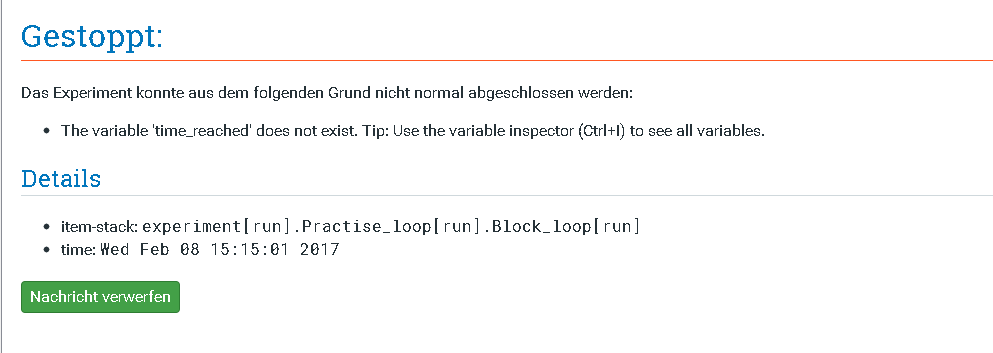
Is it here that I should set the timing experiment? I tried it but I got an error message telling me that the variable time_reached is not defined
.
2)Here is the general structure of my experiment:
and in the preparation phase of the very first Inline_script, I wrote this:
The canvas is to indicate which digit should be use for each keyboard item and I want that to be permanently displayed to the user for 30 s (block duration)
the run phase will then follow like you mentionned with total_response ='' followed by
My two last Inline_scripts go as follow:
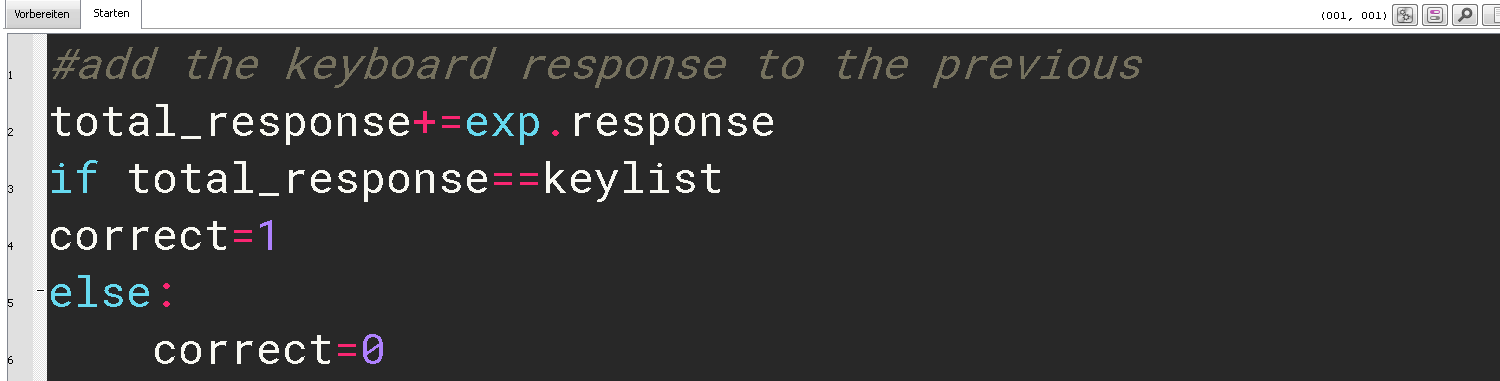

And Logger at the end.
Where are my mistakes? Where should I accurately insert the timing and pause informations? What should I enter as variables knowing that I am looking for a string at the end of the trial_sequence and not single characters?
Sorry for the length. I tried to give as much infos as I could.
I might sound odd and I thank you for bearing with me:)
Carine
Hi Carine,
Would you mind uploading the experiment? I'd like to have a quick look myself.
Thanks,
Eduard
Hi Edauard,
thanks a lot in advance. Since my last post I have got a small step further in my understanding of both python and OpenSesame and tried to fix at least the syntax. Yet, I am still struggling with several points.
Here is the experiment attached.
Carine
Hi Carine,
I took the liberty to change your script quite a bit. Your strategy had a few problems, which would have caused time of your 30 seconds to have used up by some overhead costs.
Does that script do what you want?
Feel free to ask if anything is unclear.
Eduard
Hi Eduard,
this is awesome! This uis exactly what I want. Thank you so much. I will modify it to get multiple blocks. As it is now, the experiment is running well and I used a start-stop watch to check the timing of both the run-block and the pause. I have added a logger immediately after the block sequence to track the response_time and the number of correct responses. My problem is that I am getting NA for accuracy, response_time and average_rt. However I can see the details of the key presses in "total_response". Any idea how I can get the results in numbers? (time, correct response?)
Many thanks again.
Carine
Hi Carine,
The variables
accuracy,response_timeandaverage_rtare computed per default by Opensesame. For them to represent the correct values, you need to label the variables the exact right way (the way thekeyboarditem would do it). As your design is a little off standard experiments, it probably might make more sense for you to compute the averages yourself. For example, what would be an average response time? If you just want to know when a key was pressed, the functionkeyboard.get_key()always returns they key that was pressed and also the time when it happened. You can make a list with all the responses in a similar way I made the list of keys (of even combine them into one list). Similarly, with the correct response. It is a little tricky because I don't think it is clear to define what the correct response is on a given moment. As participants continously press keys, you don't really know where in the sequence they are. So in case they make a mistake (forget a key), you don't know how they would proceed. Would they fix the issue? Would they just continue without noticing? And if so, what is then the correct response? Do you see what I mean?Eduard
Hi Eduard,
Never mind! The issue is solved and everything is working wonderfully well. Thanks a lot for your invaluable help
Carine
Hi there !
I'm a student in Neuroscience and I need your help concerning a task that I want to code on OPENSESAME. I'm a total begginer in everything that concern coding so could you help me please concerning my task ?
It's approxymately the same problem than Carine, I want in my code to allow the subject to respond a multicharacter response when the image of a particular sequence appears.
so when the image appear the subject have to write with the keyboard the number sequence : 4-1-3-2-4-0.
But OPENSESAME don't take in consideration the multi key responses...
I've tried to follow the conversation but I can't do it on my code I don't know why...
Thanks in advance,
Hatim
Hi @hatim,
Welcome to the forum if you're new.
If you're a OS newbie, I would strongly recommend checking out the tutorials and documentation available to familiarize yourself with OS's basic features and structure.
To collect multiple responses/characters, there are two options. One is to use the
form_text_input(useful when you want participants to type the response to a question), or to include the keyboard object within a loop with many cycles, use code to concatenate the keys pressed, and define a condition that will end the loop. From your brief description, I think that the latter is what you need. You can find an example here: https://forum.cogsci.nl/discussion/5876/collecting-multiple-character-input-in-osweb-e-g-student-numbers. This example illustrates how to collect a multiple characters id from the participant but can be applied to collecting multiple responses to a picture. The example uses coding in Javascript (a similar result could be used programming in Python if you prefer).You should also check this thread: https://forum.cogsci.nl/discussion/comment/24546#Comment_24546, where the same general method is applied and the problem of leading zeros is addressed (if subjects type 0-2-1, the response registered is "21" because a sequence of digits starting with zero is treated as numerical and the zero ignored.
I think that these two examples and discussions should allow you to solve your problem.
Kind regards,
Fabrice.
Hi @Fab
Thanks for your response ! it helped me so much !
I'm still blocked I don't know why I've tried to do the things said in the forum...
the task is carried out in this way:
- the subject sees appearing on the screen a sequence of numbers (4-1-3-2-4-0)
- Then, when this sequence appears, he/she must copy this sequence on the keyboard as quickly as possible.
- when he types the last digit "0", we switch to another image imposing a rest time
- then the subject repeats the action a second time.
- and finally an image displays the level of accuracy of the subject on these answers and his reaction time.
here is my code, I'm only interested in the "practice_loop" part for the moment
the part where I block is to allow the subject to type a combination of numbers when the sequence appears.
HI hatim,
I'm still blocked I don't know why I've tried to do the things said in the forum...
What exactly do you mean with "I'm still blocked"?
- when he types the last digit "0", we switch to another image imposing a rest time
This part is important. What is supposed to happen if a participants doesn't type in the correct last digit, or does not provide the correct number of digits? Intuitively, I would say the easiest would be to let participants decide when they are done, by asking them to
press an Ok button, or hit the return key, once they are done. I attach a simplified example for this design.
If you want the experiment to detect "automatically" when a subject is supposed to be finished, things are a lot more complicated.
Also, I can only second @Fab's recommendation. Especially as a beginner, it makes a lot of sense to take a step back and spend some time on tutorials and understanding the basic principles of Opensesame (or any software/tool). This will make your life so much easier in the future, that your initial time investment will definitely be worth it.
Eduard
Hello everyone,
I'd like to start by explaining my task and then the related problem. I hope you'll be able to shed some light on the situation...
First of all, for my task, the subjects have to enter a sequence of keys as quickly as possible. This is called the "finger tapping task" for those who are familiar with it.
This sequence appears in numbers on the screen in the form "0-4-1-3-2-4-0", but is coded in letters so that the participant can use the keyboard in a way that's more comfortable for him. He therefore uses the keys "'space' ;d ;j ;t ;y ;d ;'space' ".
This sequence is entered 6 consecutive times.
The result is this type of organization:
1. 0-4-1-3-2-4-0
2. 0-4-1-3-2-4-0
3. 0-4-1-3-2-4-0
4. 0-4-1-3-2-4-0
5. 0-4-1-3-2-4-0
6. 0-4-1-3-2-4-0
This is the code used to enter the values and count them as a score:
The variables used to calculate the score are the response time and the accuracy of the response entered. The response time is calculated from the first sequence on the space key, and the code counts 6 key inputs.
The problem I'm currently having is that when the sequence entered by the participant contains a missing or extra key, this shifts the other sequences. So instead of being wrong for one sequence out of 6, the participant is counted wrong for all the rest of the task, because all the other entries are shifted by his error.
For example, if the participant is wrong on sequence 2:
1. 0-4-1-3-2-4-0
2. 0-4-1-3-3-2-4
3. 0-0-4-1-3-2-4
4. 0-0-4-1-3-2-4
5. 0-0-4-1-3-2-4
6. 0-0-4-1-3-2-4
then all the other entries are shifted but the participant has entered correctly the answer !
I don't know how to solve this problem.
Hi hatim,
Without having some landmark-like response that marks the end or the start of a sequence, there is not much you can do about it. I can't see a way to reliable detect errors solely based on participants responses.
So, if you can think of a way to integrate some start/stop signal, that signal can then be used to infer whether an error occurred and adjust the count of the following sequences properly.
Eduard
thanks I've fixed the problem !