


[open] Custom forms with sound: A play it again button

Hi,
Another question on custom forms.
I have created a custom form with an inline python script. While the form is displayed a sound is played (soundname fetched from surrounding loop item):
my_sampler = sampler(exp, exp.get_file('path'+ sound +'.wav'))
my_sampler.play()
This works, but I would like to add a button to the form that plays the same sound again if it is clicked and without proceeding to the next item in the sequence.
How can I do this?
Best,
Johannes
Comments
Hi Johannes,
I just answered your previous question, and I think the same strategy can be applied for this one.
Hence, you place the form in a loop sequence together with the item that plays your sound, and for the sound item insert a run-if command so that it is only played if a certain variable is set to True (or whatever you want of course), and then insert code so that that variable is in fact set to True only when your button is pressed.
Good luck, let me know if you encounter any problem!
Cheers,
Josh
Hi,
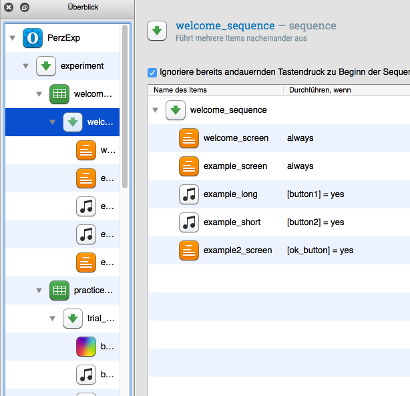
I've got a similar question.
I have a
formwith 3buttons: Button1 and button2 are supposed to start asampler, while button3 is an "ok" button that leads to the next form.I placed the forms and the sampler items in a
loopsequence as suggested here and inserted run-if commands as shown in the screenshot.The problem is that when either of the first two buttons is pressed the experiment moves on to the main experimental
loop, jumping over the rest of thissequenceAND the practiceloopsequencethat should follow (the sound is played correctly shortly before that, however).But I want my participants to be able to click on each of the buttons (ideally as often as they wish), listen to the sound played and only move on to the next form when they click on the "ok"
button.Any ideas on how this can be achieved?
Cheers,
Sophia
I got a bit further with the buttons, but still have a problem.
I deleted the
loop(which I didn't really use sensibly anyway) and just left theformsandsamplersin asequence.The sequence looks like that now:
I set the sampler duration to "mouseclick" which helped a bit. When participants click on button1 now, the correct sound is played and the form is still displayed. But the cursor isn't displayed anymore so one cannot click on button2 as the next mouseclick now leads to the following form.
How can I make the cursor visible?
I found this Python command in the mouse description:
Is there an equivalent in OpenSesame scripting that can be used with forms? Or (how) can I use this here? I've never done any inline scripting.
Cheers!
Hi,
This requires some scripting, but should be doable . First, you need to create the form that has all the buttons you need. Put it somewhere in the experiment. It doesn't really matter where, but set its run if statement to
never.Next, put an
inline_scriptin your experimental sequence, with following code.Good luck,
Eduard
Hi Eduard,
Thank you very much for your advice and script!
Running it, I got an error (that is probably due to my lack of knowledge on how Python works).
The error message is:
exception message: name 'response_variable' is not definedThe code for my
formis as follows (thevar=xyfollowing the pattern described on the Creating custom forms page):And the script you wrote looks like this after my adaptation:
So I guess the problem is that
varandresponse_variabledon't match. But if I replaceresponse_variablewithvarin theinline script, givingthen none of the buttons can be pressed and the
formis just displayed forever.How can I define the variable?
Thanks!
Ok, I figured it out in the end. Thanks again to Eduard for getting me there!
In case anyone else should get the same problem, here's the code for the
inline scriptthat worked:Took me a while to try out "yes" in a Python script...
Cheers,
Sophia