


'WebGL Unsupported in this Browser' Error

Hey everyone,
So in the past couple of months, we've been running our study using OSWeb 1.3.3. Most of the time it runs fairly smoothly, however, a few of my participants have run into some issues.
Firstly, sometimes the experiment doesn't run on FireFox, and it gets stuck on the loading screen.
Secondly, twice now participants have had the error: Uncaught Error: WebGL unsupported in this browser, use "pixi.js-legacy" for fallback canvas2d support.
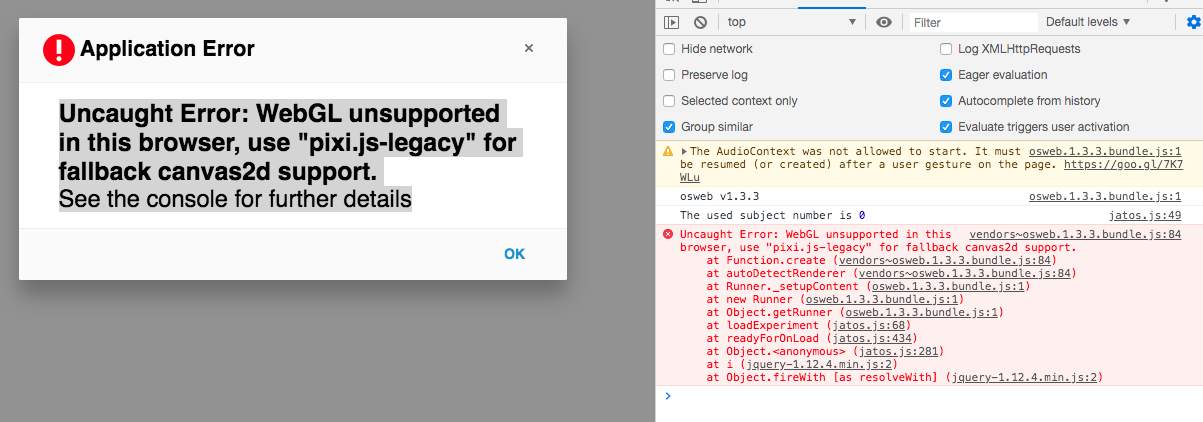
I haven't been able to replicate this error on my own, all I know is that my participant used Chrome.
Any help is greatly appreciated.
Rissa
Comments
Hi Rissa,
I have absolutely no clue about osweb. But a quick google brought me here.
Maybe this is useful to you. Sorry and good luck,
Eduard
Hey Eduard, no worries.
It seems to be a rare case so far. It might have to do with the user's Chrome install, their graphics card, or a combination of both. Additionally, the OP of the thread you sent suggests that their hardware acceleration on chrome was the issue. I was actually able to replicate the error on my version of Chrome by adjusting the settings to disable hardware acceleration. While I am uncertain if my participants have also disabled this setting, at least it is not OSWeb which is the source of the issue.
If any other user has encountered this issue, I'd love to hear your thoughts.
Thanks for the suggestion.
Rissa.
Hi @lmelvill
I know that hardware acceleration of Chrome (not Chromium!) on Linux is not working, so it may be that your participants tried to run the experiment in that browser. Alternatively, they use an older version of Chrome (or any browser) that does not support WebGL yet. You need a pretty recent browser to be able to use Osweb. These errors are incidental and difficult for us to do anything about it.
Dear @lmelvill
Thank you so much for your post, I had the same problem.
For me (Chrome 87.0.4280.27 ), it was only the "Use hardware acceleration when available" that needed to be enabled.
Regards,
Fotis