


Challenges to conduct the randomized memory trials between the primary task trials.

Hi everyone,
I have a study which is collecting data in the lab. The flow is as the below picture. The primary task requests participants comprehend sentence in each trial. After 6 to 8 trials, participants will verify if they read the sentence in the latest 3 trials. `Memory loop` manages this memory check. We use python code to control the timing and content of memory check.
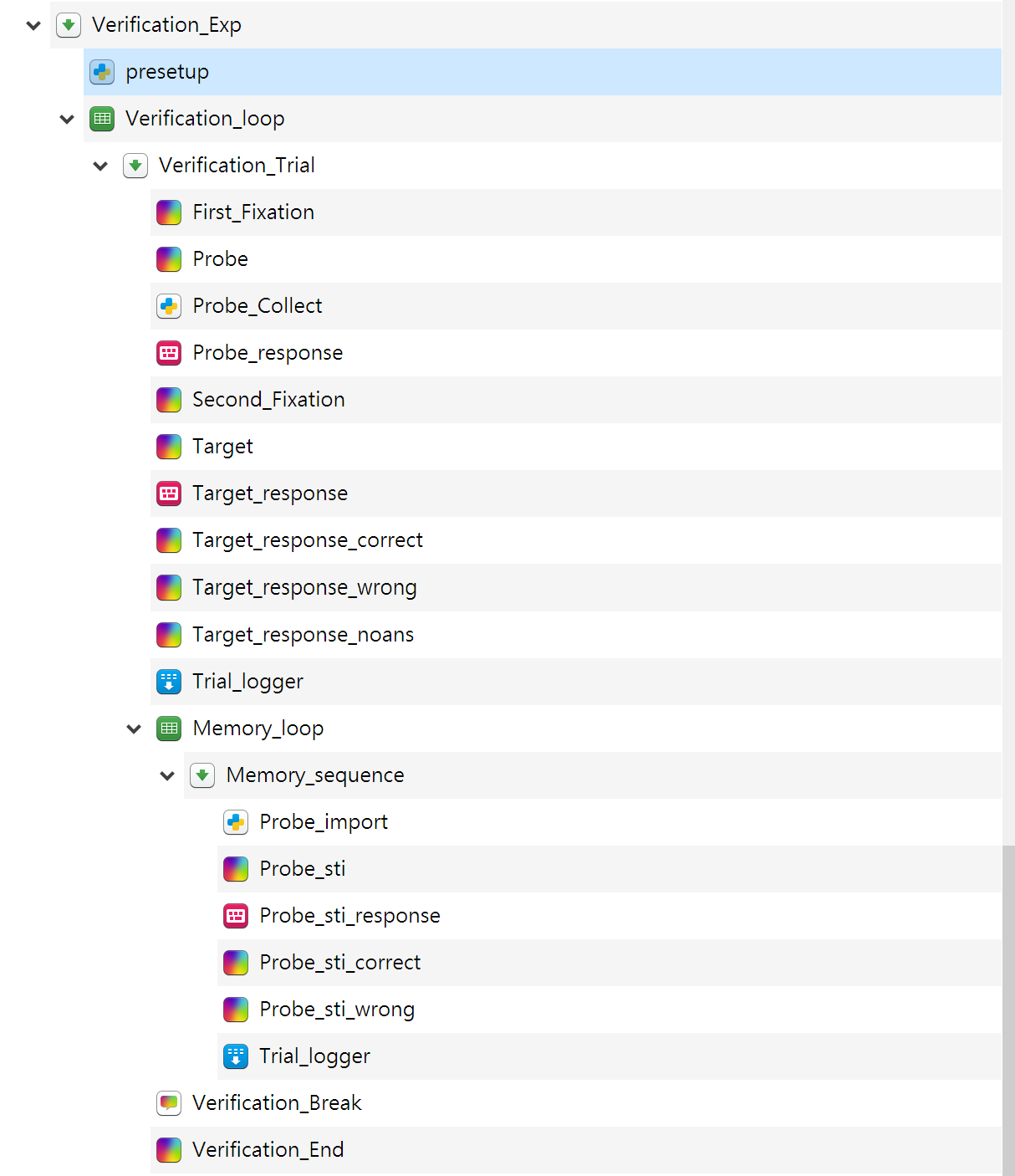
Because of the global lockdown, we are attempting to move this task to the internet. I found some challenges from the words about Inline Javascript:
The JavaScript workspace is not persistent. That is, if you define a variable in one script, it will not be accessible in another script. Exceptions are the vars object and other variables that are globally available in JavaScript
Our python code used the self-defined variables satisfied our goal. After several times of tests, I realized we cannot migrate python logic to JavaScript. I assume some alternatives would be implemented in this case but I am lack of experience on JavaScript programming. Is there any way we can run the task on line as like in the lab?
Below is the inline python code in our old script:
presetup
### codes from http://stackoverflow.com/questions/27276135/python-random-system-time-seed

import random

from datetime import datetime

random.seed(datetime.now())


### Call empty list for comprehension task

probe_list = []

### Select the index of sentences for comprehension task

a = range(-1,2)*10

random.shuffle(a)

idx_list = [sum(x) for x in zip(range(6,49,4), a)]

### Save the index in the variable

var.set('alt_task',idx_list)
Probe_Collect
### Enqueue the probes into list

probe_list.append(self.get("Probe"))
Probe_import
### Randomly select the probe sentence from list

import random

### Choose from the past 16 trials; otherwise choose from the past 8 trials

#if(self.get('count_Probe_Collect') < 8):

# idx = random.choice(range(len(probe_list)))

#else:

idx = random.choice(range(len(probe_list) - 6, len(probe_list)))


### Export the probe sentence for recognition

rectarget = probe_list[idx]

var.set('rectarget', rectarget)

### Set up correct_response

if(idx > (self.get('count_Probe_Collect') - 3) ):

var.set('correct_response', 'j')

else:

var.set('correct_response', 'f')
Comments
Hi @CSC
It seems quite feasible to translate your code from python to javascript. You don't do anything in Python that you wouldn't be possible in osweb javascript. The only challenging part would be the random functions (shuffle, choice, etc) which javascript doesn't offer by standard, but if you Google them, then you will easily find some ready to use examples.
The JavaScript workspace is not persistent. That is, if you define a variable in one script, it will not be accessible in another script. Exceptions are the
varsobject and other variables that are globally available in JavaScriptBasically this means that if define a variable in one inline_javascript (e.g.
my_var=1) then it will not be available in another inline_javascript item. To make them available across several inline JS items, you need to store this variable in thevarsobject, which is retained between items (e.g. dovars.my_var=1)To get you started with JavaScript, you can follow this tutorial: https://osdoc.cogsci.nl/3.3/tutorials/wcst/ and read through: https://osdoc.cogsci.nl/3.3/manual/osweb/javascript/
Thanks @Daniel
I have found the way to manage the javascript code based on the python code. However I am engaged in new issues.
First issue is we recollected the sentences appeared in the past trials in an array, then we pick one as the target in
memory_loop. Each sentence is a long string like "There is a book on the table.", and we expected the beginning element of the recollected array is the latest sentence. However, we found inline_javascript accessed the character only. For example, in this loop we picked the first element (say "There is a book on the table") as the target, inline_javascript accessed the first character "T" only.Second issue is we can not control the display the variable we assigned the value in the inline_javascript. For example, we decided in this memory loop the target sentence is "There is a book on the table." and assign it to the variable
rectarget. Although the log showed the appearance of this sentence, the sketchpad never showed the sentence inrectarget.I tested the feasibility of these methods on the web browser. Is there any wrong in the OpenSesame inline_javascript?
Hi I found the reasons caused the recent problems although I have yet solved them.
According to W3Cschool tutorial ( https://www.w3schools.com/js/js_es5.asp ), in ECMAScript 5.1 str[#] access the character in a string rather than a string in an array. To pass this restriction, `
Probe_Collect` used .concat() connect the presented sentences trial by trial. InProbe_importI convert the connected sentences to array in use of .split(). The current problem is the below code can not connect the sentences:if ( vars.probe_list.length > 0) { vars.probe_list = vars.probe_list.concat(vars.probe_list,vars.Probe,"|"); } else { vars.probe_list = vars.probe_list.concat(vars.Probe,"|"); }Although
rectargetis a string but we can not show that on screen.All right. I have wiped out all the difficulties. Here are the solutions:
*note*: because the original post is too long, I split this post into two parts.
Below clip shows the overall sequence of an experimental trial. I made two major revisions based on two limitations: (1) Conditions to run
inline_javascript, "Run if" is available for only one condition. (2) OSWEB ignoredloopin asequence.Codes in
presetup:// getRndInteger(min, max) returns a random number between min and max (both included): function getRndInteger(min, max) { return Math.floor(Math.random() * (max - min + 1) ) + min; } // Call empty list for memory check vars.probe_list = []; // Call counters for trial sequence vars.trial_seq = 0; // Call memory slot for probe list length let list_length; // Call target for memory check vars.rectarget = []; // Generate the index of memory check // save each randomized sequence into each variable vars.check_0 = getRndInteger(7,9); vars.check_1 = getRndInteger(10,12); vars.check_2 = getRndInteger(13,15); vars.check_3 = getRndInteger(17,19); vars.check_4 = getRndInteger(21,23); vars.check_5 = getRndInteger(25,27); vars.check_6 = getRndInteger(29,31); vars.check_7 = getRndInteger(33,35); vars.check_8 = getRndInteger(37,39); vars.check_9 = getRndInteger(41,43); vars.check_10 = getRndInteger(45,47);trial_seqrecords the sequence number of the current trial. This variable decides in which trial we have to run the secondary task, give a break, and finish the study.probe_listis to save the presented probes since the first trial. The latest probe will be updated to the head of the list.list_lengthcounts the length ofprobe_listat each trial. The maximal length is 6 included the latest presented probe.rectargetis to save the probe for presentation while the memory check initialize.check_#refers to the trial number the memory check initialize after the verification response.Codes in
probe_collect//Concatent the probes into a list if(vars.probe_list.length == 0){ // Add first probe into the list vars.probe_list.splice(1,0,vars.Probe); } else if (vars.probe_list.length > 0 & vars.probe_list.length < 6) { // Add the last probe into the list till length = 6 vars.probe_list.unshift(vars.Probe); } else { // After length = 6, revmove the oldest probe then add the newest probe vars.probe_list.pop(); vars.probe_list.unshift(vars.Probe); } // Store vars.list_length = vars.probe_list.length; // Incredimate vars.trial_seq += 1;if-else condition control the probes saved in
probe_list. This script updateslist_lengthandtrial_seqfor the next trial.Codes in
Probe_import// getRndInteger(min, max) returns a random number between min and max (both included): function getRndInteger(min, max) { return Math.floor(Math.random() * (max - min + 1) ) + min; } // Locate the probe to be checked vars.anchor = getRndInteger(0,5); // Use the first anchor vars.rectarget = vars.probe_list[vars.anchor]; // Set up correct_response if(vars.anchor < 3) { vars.correct_response = 'j'; } else{ vars.correct_response = 'f'; }anchorsaved the position number to be selected asrectarget. That probe saved inprobe_listwill be assigned torectarget.anchoralso decided the correct response of the current memory check.There are some other problems I require the assistance. Because they are out of this topic, I'll open the other post to discuss them.
Hi @CSC,
This looks all good. It is not entirely clear to me if you have solved the problems you were facing or are you still struggling with some aspects (that you are describing in a different post?). Is there anything specifically you still need answers on in this post?
Thanks @Daniel
I have solved all the issues in this post.