


Adding support for numpad in textboxes

Hi!
I'm currently trying to get input from the num pad to work as input for a textbox.
This is my current validation function: I know that everything below the regex works for numbers on the keyboard. What it does is it checks if the full string in the textbox is smaller than 1, if so it can add one number between 0 and 8. Then if there is already one number, but a backspace is pressed, the number can be removed. (after which the length is again smaller than 1 so a new number can be input). In any other scenario nothing should be added. So things such as an 'A' or 83234213 are not possible.
What I try to do with the regex is take the input from a num pad number, which is num_1, num_2 etc and strip it from everything but the number, so that just a 0 to 8 is left over. It should then be able to accept it as an input, but nothing happens when I fill it in in the text box.
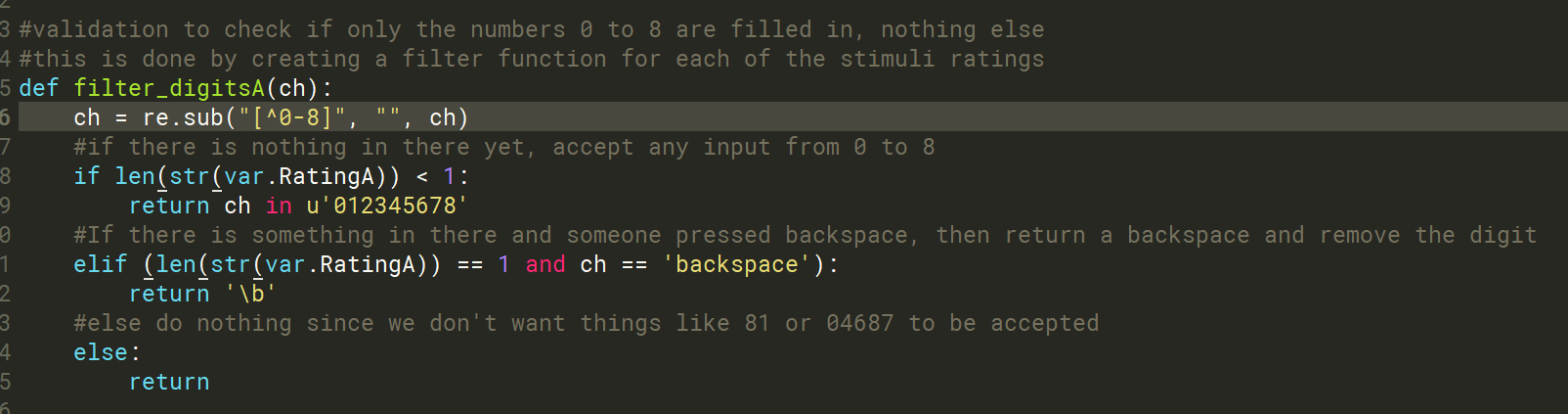
What solution to the current code can I add to include input from the num pad?
Kind regards,
Sanne
Comments
Hi @Sannee ,
If you are sure that the prefix is always "num_", you could use the
strip()method:stripped_var = raw_input.strip("num_")Where raw_input is the raw input from the num pad.
Does this help?
Cheers,
Lotje
Did you like my answer? Feel free to

Hi Lotje,
This has the same result as the Regex for me. If I put print(ch) behind the regex or this line, it says that ch is a number (so the num_ has been removed successfully). However it still won't fill anything in in the textbox itself.
Kind regards,
Sanne
Hi @sannee,
I know that everything below the regex works for numbers on the keyboard
If you are certain about this (I can't get my head around of the code so quickly), then the problem is probably that after the regex operation, you are continuing with the variable var.RatingA whereas you called the variable you just stripped char.
So after you've defined the variable var, you could add a line saying that:
and then continue with the rest of your script.
Hope this helps!
Cheers,
Lotje
Did you like my answer? Feel free to
