

[Solved] Trial counter

Hi there,
I'm having a great time running my online experiments with OSWeb, thanks for the excellent work !
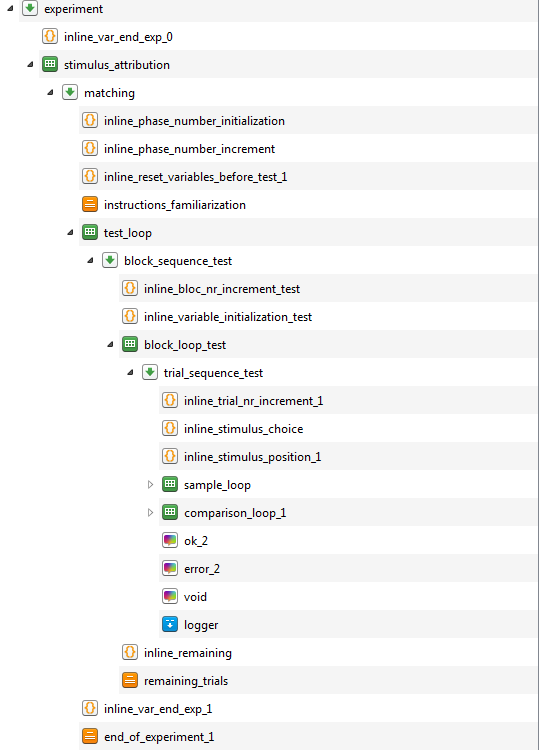
Just struggling with my trial counter. I'd like to have a text display at the end of each of my 40-trial test blocks, which says "You have [remaining] trials left", so 120 left, 80 left, etc. I define this variable as "vars.remaining = ..." in my java "inline_remaining" but upon execution it says that the variable is not present in the variable store. I only manage to get a correct display of the text when I define vars.remaining UPSTREAM of my test_loop, whereas I would need to define it within this loop so that it's correctly updated (see below my experiment's structure).
In general, I've noticed that my program sometimes craches when some custom variables are not defined at the same loop level. Looks like some variables are local for some loops, sthg like that.
Someone has an explanation? :-)
Cheers,
Comments
I think your problem is related to point 4 here: https://osdoc.cogsci.nl/3.3/manual/osweb/javascript/
Is that possible? If not, could you share your experiment so that I could have a look?
Alternatively, if your loop is not randomized, you could add the remaining trial counter to the loop table. That could simplify things.
Eduard
Oh, my loop is randomized but that would have been a cool idea ;-)
Yes it seems to have to do with non-persistent workspace.
But if I simply define "vars.remaining = 200" in an inline_javascript and then put "You have [remaining] trials left" in a text display placed right after it, I still get the error message "remaining is not present in the variable store". Do you have an idea on how to proceed?
Ideally I would like to use the "count_block_loop_test" variable to calculate the number of remaining trials, but not sure how to write the arithmetics. I got some messages with NaN instead of "remaining" value.
I'm attaching my OS file. I shortened the experiment so that it's easier if you want to run it.
I still get the error message "remaining is not present in the variable store". Do you have an idea on how to proceed?
This sounds like an prepare-run-strategy issue: https://osdoc.cogsci.nl/3.3/manual/prepare-run/
Does the problem still occur if you use a feedback item instead of a sketchpad? Or if you put the code into the prepare phase?
I can't run your experiment in the browser for some reason, so unfortunately I can't test it. And it also very long to quickly test a simple thing.
Hi @ChartTom ,
Your experiment is too long for me to look at, but if it helps, I think that the reason you get an error message saying that the variable "remaining" does not exist is because you define that variable during the task and call upon its content from a sketchpad within the sequence or loop where you define that variable. Sketchpad are drawn ahead of the sequence running, which means that even if your sketchpad is at the end of a sequence and after your inline object defining the variable, Open Sesame actually prepares the Sketchpad before running the sequence (even if it only shows it at the end). So, at that time, the variable "remaining" you refer to on your sketchpad does not exist yet... If you define "remaining" earlier in your program, you won't get that error message... but the counting will not be up to date for the reason I explain the next paragraph...
The second thing to note is that whenever displaying information based on variables you calculate as the task runs, it is better to use a feedback object instead of a sketchpad, because only the feedback object is drawn in real time. So, if you keep incrementing a variable like a trial counter for example, and you then display it on a sketchpad, it will not show the current value of that counter but the value it had at the time the sketchpad was prepared (i.e., at the onset of the sequence being run). In contrast, in a feedback object, you'll see the current value displayed.
I attach a very basic example where I count trials and trials remaining and display that information at the end of each of very short 4 blocks. I included both a feedback object and a sketchpad with the same text so that you can see that only the first displays the current values of these counters.
Hopefully that will help you solve the issue in your own task.
Good luck!
Fabrice.
ping @eduard
Dear Fabrice and Eduard,
Thank you, now I got it! Your program example was very helpful Fabrice. In my case, defining the 'remaining' variable in the Prepare phase solves the problem. I have tested Sketchpad, Feedback and Text_display items. I observe that all three display the correct number if I define the variable in the Prepare phase, whereas only the Feedback item does if I define the variable in the Run phase.
My apologies for not answering earlier, I was busy with other experiments.
Cheers,