

Problem in installing JATOS

Hello, I'm trying to save my open sesame experiment as an OSWeb file using JATOS.
So far, I installed Java and jotas_win_java packages by following the instructions to run it in my window, but I can't execute the loader of JATOS.
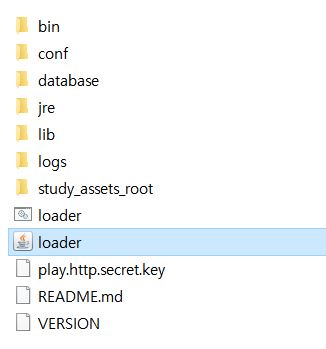
This is what I can see in my jotas_win_java folder, and I'm not sure why it's not executable. (They're still in my download folder, the location of it might be a problem?). Does anyone know how to solve this issue? Thank you.
Comments
Hi, from what I see in your folder structure your JATOS started normally. What happens when you open
localhost:9000in your browser? And do you get any error messages in the terminal window that opened after you clicked on loader.bat?Best,
Kristian
It shows me 'ERR_CONNECTION_REFUSED' and for some reasons I simply can't open loader :(
Sounds to me like you started several loader.bat. Or some other server is using port 9000. What happens when you open
localhost:9000in your browser?Hi Kristian,
When I put http://localhost:9000/ in my browser it shows me 'ERR_CONNECTION_REFUSED' and can't reach the site. Could you please let me know what I am missing here? Thanks so much.
Not sure what's going on. What's in JATOS' log. You can find them in the installation folder in
logs/application.logandlogs/loader.log. Are there any exceptions or errors?I got:
2021-11-19 11:33:33,716 [INFO] - g.OnStartStop - JATOS started
2021-11-19 11:33:34,230 [INFO] - p.a.Play - Application started (Prod) (no global state)
2021-11-19 11:33:34,648 [INFO] - p.c.s.AkkaHttpServer - Listening for HTTP on /127.0.0.1:9000
but can't see anything after this, (no log for 20th and 21th) and the loader seems to open but closes itself in a second. I installed JATOS first without Java... will it be a source of a problem?
So JATOS started without errors. Hm. Java is not the problem - JATOS would start without it. Is there something blocking access to port 9000 on your computer? Is there maybe some kind of firewall / virus protection installed?
I carefully went through the documents again and solved the issue. Thanks!
That is nice! Do you think others could encounter the same problem? Then please consider sharing it here with us.
I tried to open loader with Java and couldn't open it that way but was able to open it and found an address to tryout server with command prompt.
Hello, could you explain me how you did it? I encounter exactly the same problem with JATOS. Thank you ^^ !
@Zephyr Once I downloaded the packages, I got the id and pw for JATOS (you can choose between tryout server or registration with mindprobe or with your own server) to log-in and to import the OSWeb file of my open sesame experiment. Hope it helps!