

public / Institution jatos page not working

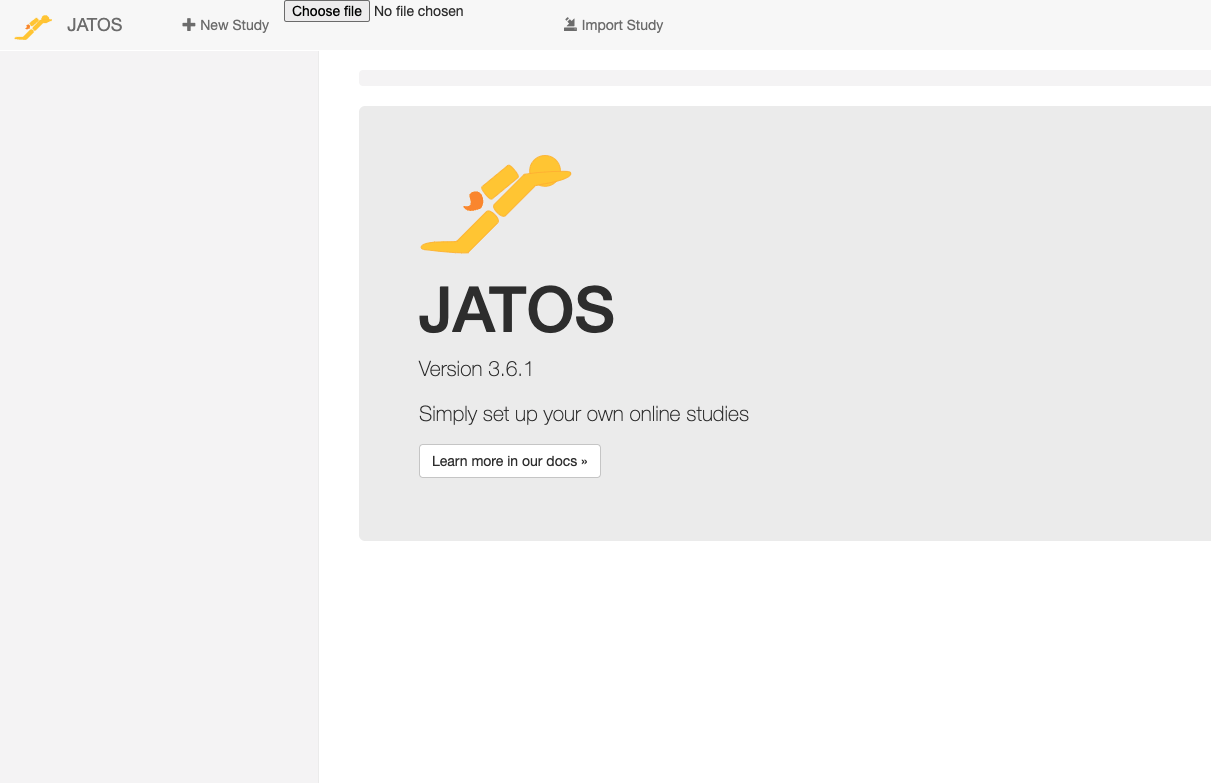
my personal JATOS is working perfectly, but I am trying to export a study to my institutional JATOS account so I can collect data but the institution site isn't working. The site is frozen and has been stuck in the same format since yesterday afternoon, and isn't showing any of my studies and does not let me navigate around the site (see attached screenshot). I can't even log out and log back in again. The 'choose file' box at the top also seems to be stuck, and has been there since yesterday and doesn't disappear even with a computer restart.
I've spoken to the IT dept at my institution and they have not had a problem reported with the site, so I wondered if there is an overall problem with JATOS that might be preventing the site from working?
Comments
Hi,
Your institution's JATOS is out of our control, and if it worked before we have no way of troubleshooting ourselves.
But if your IT say that they didn't get any problems reported by anybody else, then it sounds like the problem is on your side? This shouldn't be necessary but just to troubleshoot: Did you try a different browser?
I agree with elisa, your JATOS looks strange. There shouldn't be a 'choose file' button and the JATOS logo and welcome message is usually centered. Can you try it on a different computer?
I tried in a few different browsers and nothing worked, but then a few hours later it just started working again, although I still can't download any data (it just loads seemingly indefinitely). It seems maybe that my institution's connection to JATOS has some issues? Do you know if this is something that can happen?
Everything else on my machine is working fine. Unfortunately I don't have another computer I can test on.
When you open the JATOS page are there any errors in your browser's Console? You can find the Console if you open your browsers developer tools (while being on the JATOS page) and then tab Console.
I get one error and one warning - see screenshot attached
Looks like something setting a 'Content Security Policy' (https://developer.mozilla.org/en-US/docs/Web/HTTP/CSP) that prevents a library that JATOS UI uses, called StreamSaver.min.js, from opening an iframe. JATOS does not set this policy - it must be some other intermediate server, likely an Apache or Nginx reverse proxy set up by your university's IT dept. The preventing policy is according to your error message is:
"default-src 'self' les-jatos.bham.ac.uk".I'd recommend to talk to your IT dept. I see two possible solutions:
frame-srcpolicy that allows the opening of the iframe (https://developer.mozilla.org/en-US/docs/Web/HTTP/Headers/Content-Security-Policy/frame-src) with the 'src' point tohttps://jimmywarting.github.... I can't see the rest of this URL in your error message.Hope this helps,
Kristian
Hi Kristian,
Thank you so much for your response, this is very helpful.
Do you know of any substantial changes to functions within JATOS that would mean updating required me to make changes to my existing code, or would I simply need to update the JATOS files within my root folder?
Additionally, if I update my JATOS would I also need my institution to update anything in order to overcome the security policy issue?
I will pass the above information on to my IT department but it may be quicker for me to upgrade and change my code!
thanks again,
Juliet
Hi Juliet,
Kristian will correct me if I'm wrong but your IT should do the update on the server - the problem is when you log on to the server so updating locally on your computer will not help.
To update locally, the best is to log in as admin (the first user) and click on update when you see the prompt.
Best
Elisa
Hi Juliet,
Do you know of any substantial changes to functions within JATOS that would mean updating required me to make changes to my existing code, or would I simply need to update the JATOS files within my root folder?
You can read more about the new JATOS version in its release notes. But you don't have to make any changes to your study's code.
Additionally, if I update my JATOS would I also need my institution to update anything in order to overcome the security policy issue?
Probably not. But like Eli said, unless you have an admin user on JATOS (you can see the Administration page on the JATOS header) you won't be able to upgrade your institute's JATOS on your own and you have to ask your IT dept anyway.
Best,
Kristian
Okay thanks so much! I will pass this on to my IT dept.
As an aside - I tried to update my own JATOS in the interim while waiting for IT to get back to me, and I can't load the newer version. the loader.log is giving me an error related to my version of java being too old (I think) but my computer says I'm using the most up to date version of java and was auto-updated this year (for reference I'm using a mac)
If it's my IT dept that need to do the update anyway it's not a big issue right now, but was wondering if you had any advive about this as I may need to update in the future?
The error I'm getting is:
"Caused by: java.lang.UnsupportedClassVersionError: general/common/CommonGuiceModule has been compiled by a more recent version of the Java Runtime (class file version 55.0), this version of the Java Runtime only recognizes class file versions up to 52.0"
Thanks for telling me the Java version error. Apparently you have Java 8 installed. I'll upload a compatible version soon.
Updated the version. You can try again.