

Installing Jatos on AWS

Hello,
I am trying to set up Jatos on AWS and have been following the steps in the documentation but I am having some problems trying to connect to the server.
After porting in the private IP and starting jatos, it said that Jatos could not bind to that IP address (the same happens if I try to port in the public IP)
If I try to put the public IP in my browser, it just says the site can't be reached and the IP address refuses to connect. For the private IP, the site can't be reached either and it took too long to respond.
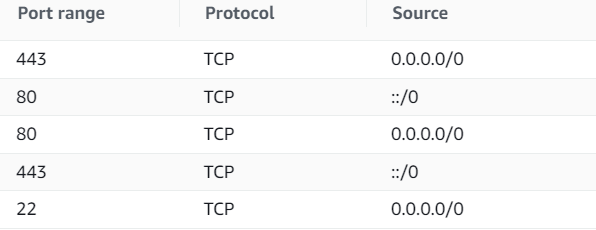
Here are the inbound rules of the instance:
I am running this on Ubuntu using the Free Tier.
Comments
Hi,
Do you have any reverse proxy like Apache or Nginx installed? On which IP and port does your JATOS run, still the default localhost and 9000?
Best,
Kristian
Hello,
No, I don't think I have anything installed on it. And yeah, it only runs on the default localhost 9000. If I try to change it to either the private or public IP it won't run.
Also even if it runs, how do I connect to it. Is it the URL of http://public IP/jatos/login, because it still doesn't connect.
I apologize in advance if anything is wrong since this is my first time setting these up and trying out AWS.
If you want to keep the port 9000 then you have to add it to your 'inbound rules'. Add two rules for port 9000 similar to port 80 or 443. But running a server on port 9000 works but is strange - default port is 80 (or 443 with HTTPS).
How does your production.conf look like? The two important fields are 'address' and 'port' and it should look similar to this:
Best,
Kristian
This is what I put in for my production.conf file (172.31.19.136 is my private IP)
If I try to run ./loader.sh start, it shows this:
Maybe something else bound to this IP and port? What is the output of
lsof -i:80?Nope, nothing was shown.
Strange. What happens if you use command line parameters?
After a bunch of digging around and experimenting, I was finally able to get it working by installing apache with "Sudo apt-get install apache2" and then running Jatos on the default setting/hosting it on port 9000. But nevertheless, thanks for the help!
Okay, you're using Apache as an reverse proxy. That's the standard way to go. Nice it's working now.