

Customized Contrast in 16.2.0

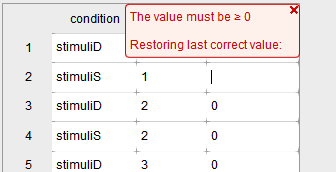
Hi all, I am trying to add contrast to my mixed model. But it doesn't allow me to type in -1. Every time I try to type in -1, it automatically turns into 1. The warning says must be larger or equal to 1. I am using 16.2.0.
If I use 14.1, then it works. I don't know if there are some new settings in 16.2.0 that I am not aware of or if there is some issue with my software.
Thank you!
Comments
Hi @BillL2 ,
Thanks for reporting this, I just asked our programmer if something changed in that particular widget, since it is definitely supposed to support negative values!
Kind regards,
Johnny
Hello @JohnnyB ,
I have the same problem as @BillL2.
Is there any solution to fix it? Or is it a problem with 16.2.0?
Thank you!
Hi @amelie1711 ,
Unfortunately this is an issue with 16.2 - it is fixed now, but the fix will only be in the next release. So you can best use 16.1 for contrast analysis. Apologies for the inconvenience.
Kind regards,
Johnny