

Show randomly one of the stimuli presented before, as a question.

Hi everyone.
I have made a loop that shows some pictures in a random order.
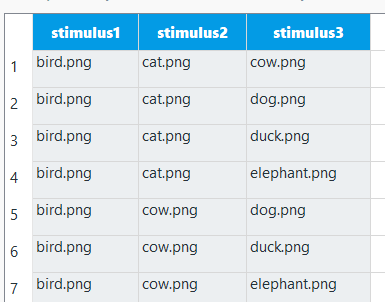
After the presentation is finished for each circle I want to present one of the pics that was shown in the specific circle (randomly selected), and ask a quetion about it (e.g. "was it second?"). I have written the following:
from random import shuffle
from openexp.canvas import canvas
my_list=[var.stimulus1,var.stimulus2,var.stimulus3]
to_be_shuffled=my_list
shuffle(to_be_shuffled)
target_pic=to_be_shuffled[0]
my_canvas=canvas(exp)
my_canvas.clear()
my_canvas.text("Was it second;")
my_canvas.image(target_pic)
my_canvas.prepare()
my_canvas.show()
self.sleep(1000)
I keep getting the error : "bird.png" does not exist
Does anyone have any idea what is going on?
Comments
Hi @amoupsou,
Have you made sure that your pictures are uploaded in the file pool?
If that's not the issue, could you upload your task or a shortened version of it to this forum?
Regards,
Fabrice.
Hi Fab, thank you for taking the time.
Yes, the files are uploaded in the pool. I attach the task here!
Hi @amoupsou,
I had a quick look, spotted that some of your code has an identation problem (some lines of code start with an empty space, which confuses Python). But that in itself does not solve the problem. I don't typically display stimuli using the canvas object from Python and I couldn't find the origin of th problem (perhaps @eduard would know), but it seems to me taht you can achieve what you'd like using a combination of code (to select one of the pictures at random) and the Question_sketchpad to display the question as well as the correspoding picture.
I attach my modified version where I've done just that.
Hope this helps,
Fabrice.
Hi Fabrice, this actually works. Thank you very much for your contribution.
Another thing I am trying to do, is to now set a condition on what the correct response will be. This condition is that if the target_pic that was presented is the same as the var.stimulus2, then the correct response is to type "z".
I went at the inline script and wrote this far:
my_canvas = canvas(exp)
my_canvas.text("Was it second;", center=True, x=500, y=160)
my_canvas.image(var.target_pic)
my_canvas.prepare()
my_canvas.show()
if target_pic == var.stimulus2:
correct_response = z
Still I get error messages like 'unexpected indent' and when i fix the indent i get the same errors as before (e.g cat doesn't exist).
Any ideas?
thank you!!!!
Can you share your experiment again?
in any case, it should be
if target_pic == var.stimulus2:
    var.correct_response = 'z'
Eduard
Hi @eduard .
I added the code you proposed, in the inline script. Still I get errors like 'cat.png does not exist'.
Thank you!
You can use a string of the filename directly in the image canvas function. You need to use the entire path of the file. You can get it from the pool object. It is actually quite well explained in the documentation.
my_canvas.image(pool[var.target_pic])Eduard