

How to read the log file on Opensesame

Hi everyone!
This is my first time using OpenSesame (for my M.A. thesis in Linguistics). Even though my experiment works the way I want it to, I think I'm doing something wrong with the logger. I have added it each sequence (linked), but when I look at my log file, I shows about 100 columns and just 4 rows. Most of them are NA or 0, and I don't understand how to read it or what I'm doing wrong.
Could someone very kindly tell me what I'm doing wrong and where I can find information to read the log file?
Thank you so much!!
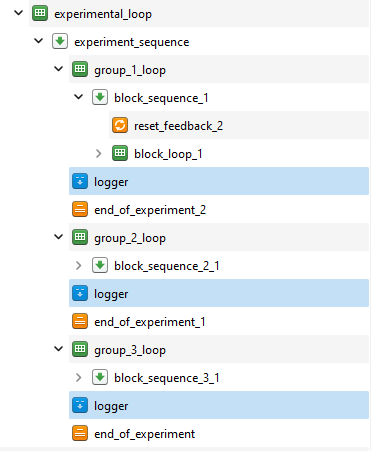
P.s. I wasn't able to load my experiment, but I attached a picture to see where the logger is, and I attached the log file.
Comments
Hi,
How many trials do you have? Normally the logger is put into the lowest level of loop/sequences, i.e. right after you collect the response. From your screenshot it appears as you have put the logger after every block of trials, which means you would only log the last one. But that's just a guess, without knowing what happens inside the loops.
I shows about 100 columns
If you want only a subset of those, you can manually pick the variables in the logger.
Eduard
Hi Eduard,
Thank you for your response!!
I have set 3 block loops with each 23 trials (sentences, in my case). Should I put the logger right after the keyboard response? Right, I inserted it after the block sequence (maybe it makes more sense from the screenshot).
Does that make sense? I feel like the logger is placed wrong maybe?
Hi Eduard!
Actually, I tried adding the logger right after the keyboard response, as you suggested, and it did the trick! Thank you for your help!