

Target position is moving

Hey dears,
I am trying to create a visual-search task with a distractor, a target and 10 other non-targets. However, only the target is not placed correctly. I am using this code below:
from random import shuffle
positions = xy_circle(n=12, rho = 200)
shuffle(positions)
search_canvas = items['search_display']. canvas
search_canvas['n_target1'].x, search_canvas['n_target1'].y = positions[0]
search_canvas['n_target2'].x, search_canvas['n_target2'].y = positions[1]
search_canvas['n_target3'].x, search_canvas['n_target3'].y = positions[2]
search_canvas['n_target4'].x, search_canvas['n_target4'].y = positions[3]
search_canvas['n_target5'].x, search_canvas['n_target5'].y = positions[4]
search_canvas['n_target6'].x, search_canvas['n_target6'].y = positions[5]
search_canvas['n_target7'].x, search_canvas['n_target7'].y = positions[6]
search_canvas['n_target8'].x, search_canvas['n_target8'].y = positions[7]
search_canvas['n_target9'].x, search_canvas['n_target9'].y = positions[8]
search_canvas['n_target10'].x, search_canvas['n_target10'].y = positions[9]
search_canvas['distractor'].x, search_canvas['distractor'].y = positions[10]
search_canvas['target'].x, search_canvas['target'].y = positions[11]
And this is how it looks at the end:
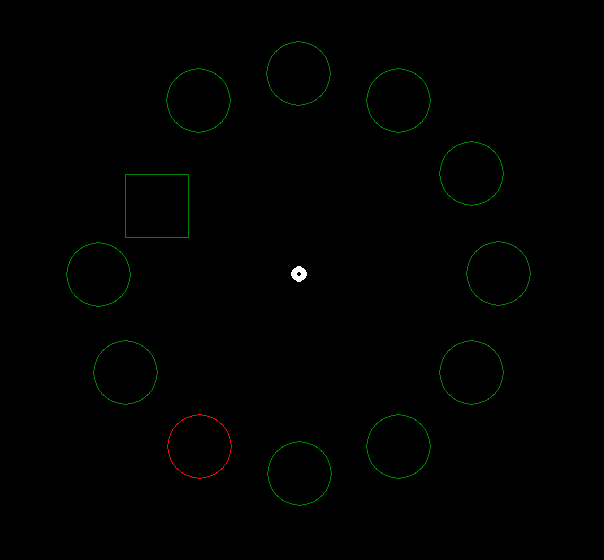
Could you please help me to fix it? Thank you very much in advance!
Comments
Hi, check the documentation of circles and rectangles:
You'll see that (x,y) for circles is the center of the circle, whereas for reactangles it means the top-left corner. That means for the target you can't use (x,y) directly, but first have to subtract the half width from x and the half height from y.
Hope this helps,
Eduard
thank you very much! it helped a lot!