


Creating an EEG-Experiment - randomized picture presentation
Hello to all:)
I want to create an EEG-Experiment using Opensesame. Participants should first see a picture for a few seconds, then try to regulate their emotions looking at said picture.
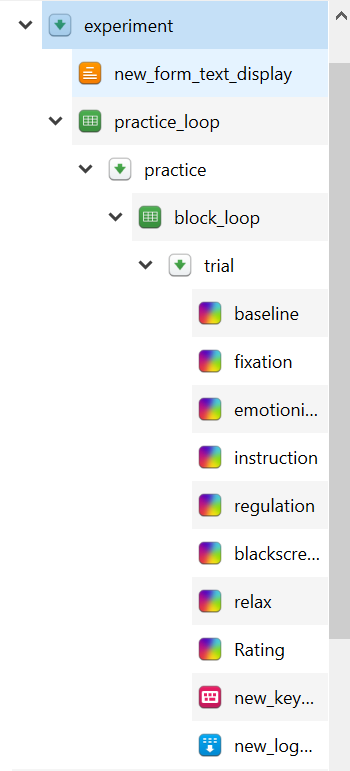
The structure sould be as following (for FFT Analysis):
- baseline 3,5s
- fixation 0,5s
- emotion induction 4s
- instruction 1s (maintain or decrease)
- emotion regulation 8s
- black screen 2s
- relax 2s
- rating
I am a complete beginner creating scripts and experiments, so i am completely lost. I tried sticking to the beginner tutorial, buti don´t know how to implement a randomized picture presentation. The programm should present 50 neutral and 50 unpleasant pictures in a randomized order, half of them with the instruction "maintain" and half of them with the instruction "maintain". Ideally the trigger for the EEG would be send after each step in the structure, but i just figured out how it works being send in the beginning of a sequence.
Is it even possible to randomly show pictures with the sketchpad Item!
I would really appericate some help.
Best,
Lena
Comments
Hi Lena,
Ideally the trigger for the EEG would be send after each step in the structure
You can use this experiment for inspiration (EEG interactions via a parallel port).
Essentially you can use the function
sendTrigger(defined inhelper_function) in an inline_script in between all the items in your sequence (importantly, in the run phase!),implement a randomized picture presentation
If you have 100 unique images and you need to present all of them, the easiest it is to just add all of them to the loop table (incl. corresponding values for valence and instruction in separate columns). If you then set the order to
random, you are already set.In case you have a larger pool of images and you would to present a random subset of images, I would add a bit of Python code. First, define the loop table as in the beginner's tutorial (with the factors valence and instruction). Second, put an inline_script in theb eginning of the sequence in which you randomly pick a file to present. Ideally, your files have easy-to-handle filenames, e.g. neutral_1.png, neutral_2.png, unpleasant_1.png. etc... Then you can simply do something like this (in the prepare phase)
import random
# pick a random integer between 1 and 50
idx = random.randint(1, 51)
# provided that you have a variable valence in the loop table that is either neutral or unpleasant
# the generate the filename based on emotion and the index
file_name = f'{valence}_{idx}'
This filename can then be used in sketchpads when you present the images.
Hope this helps,
Eduard
Dear Eduard,
thank you very much for your answer! This really helps:)
I still have one issue left, maybe you also know the answer to this one. The picture used in the emotion regulation sketchpad has to be the same picture as in the emotion induction sketchpad (choosen randomly from the file pool). Is there a way to make sure participants see the same picture?
Thanks a lot in advance!
Best,
Lena
Hi Lena,
if you use the same variable name in the sketchpad, it should present the same image (unless you change the variable in between the sketchpads).
Eduard
Hi Eduard,
i understood, that if i change the script of the sketchpad (emotion induction) from example.png to the variable name [picture].png the image is randomly selected from the file pool. Then two other sketchpads follow, the instruction and then the next sketchpad (emotion regulation) which should be the same picture as in the emotion induction sketchpad. As i understood, the variable is the picture and there would be several aversive ones. So the variable name would not change..
Best:)
Lena
Then everything is good indeed :)