Error

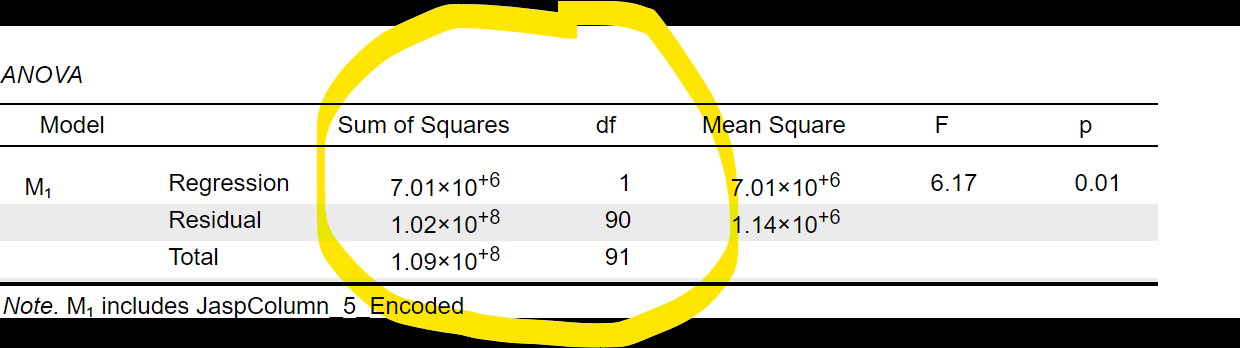
why does the output look like this? how do you fix this?

It looks like you're new here. If you want to get involved, click one of these buttons!

why does the output look like this? how do you fix this?
Comments
Hello, I'm not a member of team just another user like you, but I will see if I can explain this to you in a helpful way. First of all this is not an error at all. This is what is is known as scientific notation. If you think back to secondary school (ie high school) maths, this should have been covered regardless of the country you studied in. Essentially, 7.01×10e+6 requires you to imagine moving the decimal .6 places to the right and filling the places you just created with zeros. Equally, if the number after the 10 was negative you would move your decimal point to the left and the resulting answer would be smaller than zero. If you are uncomfortable performing these kinds of operations in your head, you can also adjust the number of decimal places in the output. Go to the blue hamburger menu on the left of your screen (three lines) click on preferences> results and enter a different value in the decimal places box.
Hope this helps?
Tarandeep
This is likely due to having a dependent variable with a very large scale (e.g. salary in dollar amounts, or something even bigger).
You could try to go in preferences and uncheck this box:
There we go, and now you will not need to worry about this notation any longer if you change the exponent notation setting as @patc3 suggests. I was working from memory, and had forgotten about this. Apologies.
@TarandeepKang your explanation was very useful