

How to Disable JASP Updates on Windows 11

Hello.
I was wondering the best way to disable updates on JASP v0.95 in the registry on Windows 11.
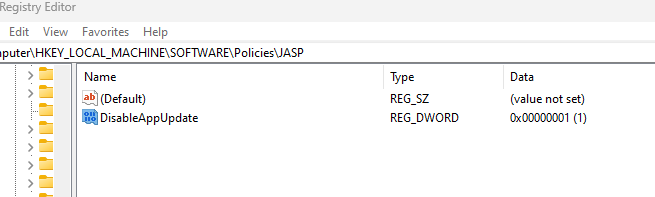
So far I have attempted in the following location:
Computer\HKEY_LOCAL_MACHINE\SOFTWARE\Policies\JASP
Made a 32bit Dword called DisableAppUpdate and set to 1
I have looked and could not find any documentation on this topic.
Thank you
Comments
If you have installed JASP through the Windows store it is Microsoft that takes care of the automatic updates, and this issue would pertain to all software, not just JASP. You'd probably get better feedback if you post this issue on the JASP GitHub page (for details see https://jasp-stats.org/2018/03/29/request-feature-report-bug-jasp/)
EJ
Thank you for your reply