

Having a problem with Timeout

Hi, love the program, but I'm having an odd problem.
I have timeout set to 3000, and I guess technically the timeout is working, but everything requires a key press to start.
For example, allowed responses are 1;2;3 and you see the stimulus (which is supposed to timeout after 3 seconds) but it just sits there. Until you press 1;2;3. Then the timeout counter starts and the keypress is not logged. Which means, for every stimulus, you need to double top 1, 2, or 3, to log a response and the timeout is effectively useless.
What I find really odd is that I have a practice trial to determine colour deficiency, and I have that set up exactly the same way (as far as I can tell) and that timeout works perfectly fine.
Please help
Comments
Hi,
Did you set the timeout in the keyboard item or during the stimulus presentation beforehand? Would you share your experiment, or at least a few screenshots of your structure with us?
eduard
Set during the keyboard item.


So that is the colour test keyboard response. The timeout works fine.
This is the keyboard response from both of the controls you can see on the left. They are both set exactly the same way.
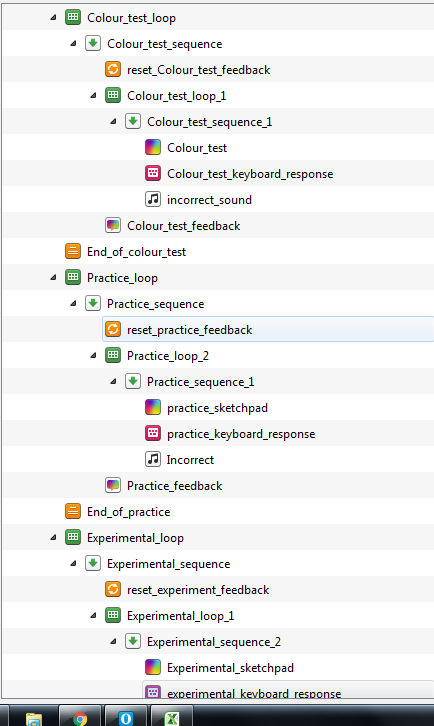

That's the overall architecture
That's the sketchpad. They're all the same just have different pictures linked.
I'm very new to this program, so I followed along with he tutorial as I made this and added/subtracted whatever I needed.
Hi,
If you set the duration of the
sketchpadto0, is the problem solved?Eduard
duration set to 0?
It did! Thank you very much. I never would have thought of that. As I said they're all set the same and the timeout for the colour test works fine even with the sketchpad duration set to "keypress"
But regardless, you fixed it. Many thanks!
There is a probably a reason for that (that needs fixing if we were perfectionists), but if it works, it works.
Hello! I also have a problem with timeout. I am building a 2x2 choice experiment where I manipulate time pressure (yes/no) and the choice task (say A/B). I have therefore generated a group variable which is taking 4 values. Respondents in groups 3 and 4 are not allowed to respond after 10 seconds. Before the experiment loop, I have initialized the variables as follows:
var.stop_loop="no"
var.t0=clock.time()
var.time_left=10000
Then I have set the loop to break if [stop_loop]==yes (repeating each cycle twice) and after the loop I have updated the variables as follows:
var.t1 = clock.time()
var.time_passed = var.t1- var.t0
if var.time_passed>=10000 and var.group==3:
var.stop_loop="yes"
elif var.time_passed>=10000 and var.group==4:
var.stop_loop="yes"
var.time_left=10000-var.time_passed
also, time out of the task responses is set to [time_left]
the manipulation works perfectly fine in the "time pressure" condition as when respondents are in group 3 or 4 the task stops after 10 sec. However, if respondents are in group 1 or 2 the experiment ends and gives the following error:
'-10401' (or any other negative number) is not a valid timeout. Expecting a positive integer or 'infinite'.
is there a mistake in my code? How can I solve this issue?
thank you in advance!
:-)
Hi there, I have not changed the code but I have added some forms after the 2 tasks and now I do not get the error anymore but the loop stops for all 4 groups, also for groups 1 and 2 where participants should have plenty of time for responding. Where do you think is my mistake? I attach a screenshot of the structure. Thank you in advance!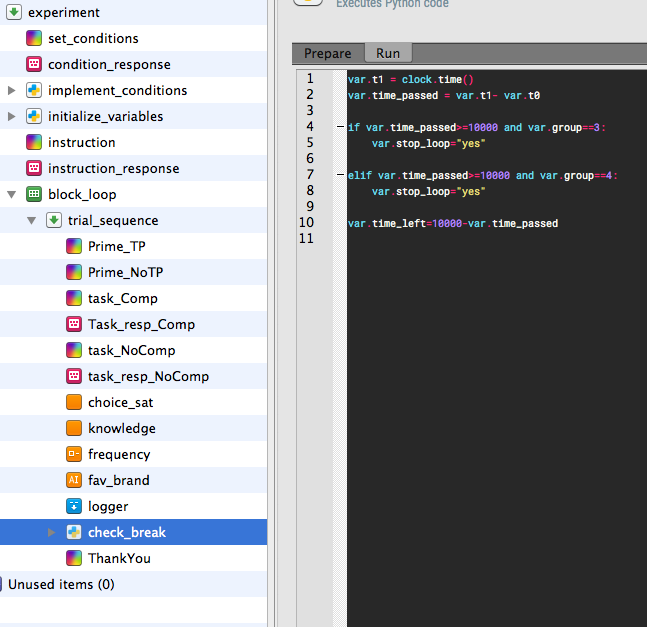
Hi Veronica,
Would you mind uploading your experiment? The issue you describe sounds intriguing and I'd like to have a look. Or did you already resolve the problem?
Thanks,
Eduard