


inline script repeat

in OpenSesame
Dear all
I created a multiple choice questionnaire using inline scripts (there is a total of 4 questionnaires):
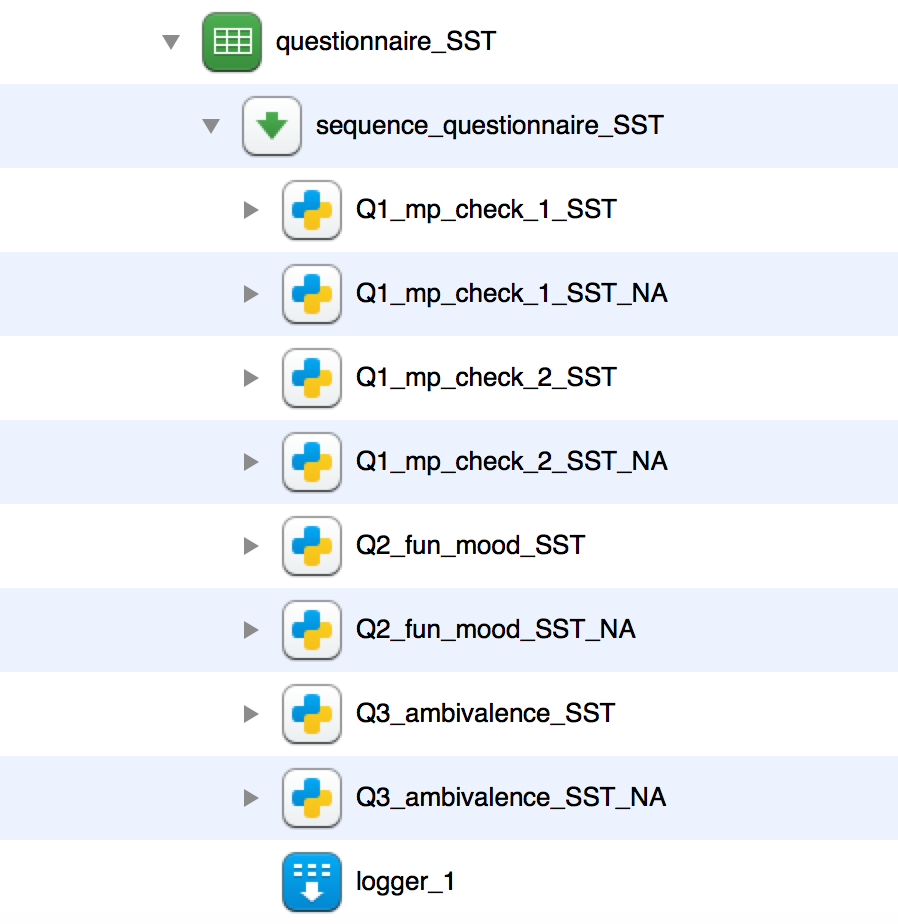
Out of experience I know that participant sometimes accidentally forget to answer a question. This is why I added an inline script (for each questionnaire - these are the scripts with "NA" at the end) which redirects them to the question so they have another chance to answer. This is the code I am using (e.g. for the first questionnaire "Q1_mp_check_1_SST"):
if var.Q1_effort_SST == None:
    no_answer.prepare()
    no_answer.show() #text warning participants that they forgot to answer a question
    self.sleep(5000)
    cv.clear()
    exp.items['Q1_mp_check_1_SST'].prepare()
    exp.items['Q1_mp_check_1_SST'].run() #redirecting them to the question

if var.Q1_difficulty_SST == None:
    no_answer.prepare()
    no_answer.show()
    self.sleep(5000)
    cv.clear()
    exp.items['Q1_mp_check_1_SST'].prepare()
    exp.items['Q1_mp_check_1_SST'].run()
This code works the first time when a question is left out. However the second time it just skips to the next question. Is it possible to repeat the cycle untill every question is answered?
Thanks,
zsc
Comments
Hi zsc,
What happens is that your script does not actually redirects OpenSesame back into the existing sequence, rather, it creates a copy of the questionnaire to display. Therefore, the script does not run again after the first time (since it is already passed in the sequence).
A solution would be to replace the
ifstatements forwhile loops:Now, the script will copy the questionnaire over and over until an answer has been given.
Best,
Laurent
Dear Laurent
Thank you very much! This solves my problem (I totally forgot about the while statement )!
)!
Cheers,
zsc
I'm sorry, I have one last question:
In my inline script (I posted above) I use 2 "while" statements. When I don't answer both questions then I get a message and I get another chance to fill out the questions (i.e. I'm "redirected" to the questionnaire). When I answer the 1. question and leave out the 2. question again I get the message and I get redirected. But after I get redirected and then only answer the 2. question then I get to continue with the questionnaire. I guess the problem is, that I have 2 while statements and the 1. question is somehow registered and the program thinks I already answered the 1. question. Do I have to combine the 2 statements in order to allow the particpants to continue with the questionnaire only when they answered BOTH questions?
Thanks!
Hi zsc,
Exactly, the program does not start at the start of your script again. Therefore you'd need to combine both statements:
This is slightly different from your original script but the main idea should be the same. This could get quite complext though, depending on the exact procedure and design of your questionnaires.
Dear Laurent
Brilliant, it works! Thank you very much for your help!
Cheers,
zsc