


Dual Task Response Collection

Hi There,
I’m currently designing a dual task experiment with OS and am finding some it a bit challenging on collecting responses for both Task 1 and Task 2.
In the experiment, I would like to present Task 1 (an audio-visual stimulus is presented) followed by Task 2 (a lexical decision task). Presentation of both stimuli was quite simple (thanks to OS  ). The problem I have is with the response collections.
I would like to collect response for Task 1, starting from the presentation of Task 1 and end until ‘keypress’. In other words, response collection should continue even when Task 2 is being presented, until an allowed response is given by the participants.
As for task2, response should be only collected after response of task 1. (See fig).

I’m wondering how I could implement this idea in OpenSesame.
Essentially, I probably need to run the following in parallel:
1. Presentation of Task 1
2. Response of Task 1
3. Presentation of Task 2
I have tried the inline script and coroutines as suggested in this post
(http://forum.cogsci.nl/index.php?p=/discussion/7/solved-recording-multiple-responses-in-one-trial, ), but I’m running two problems.
1. It seems OS is not picking up the keyboard responses when during Task 1’s presentation. It only picks up responses after both task1 and task2 are presented
2. If the Task 1 response was given after the coroutines end(in this case, after 5000ms), OS logs it as zero in the log file.
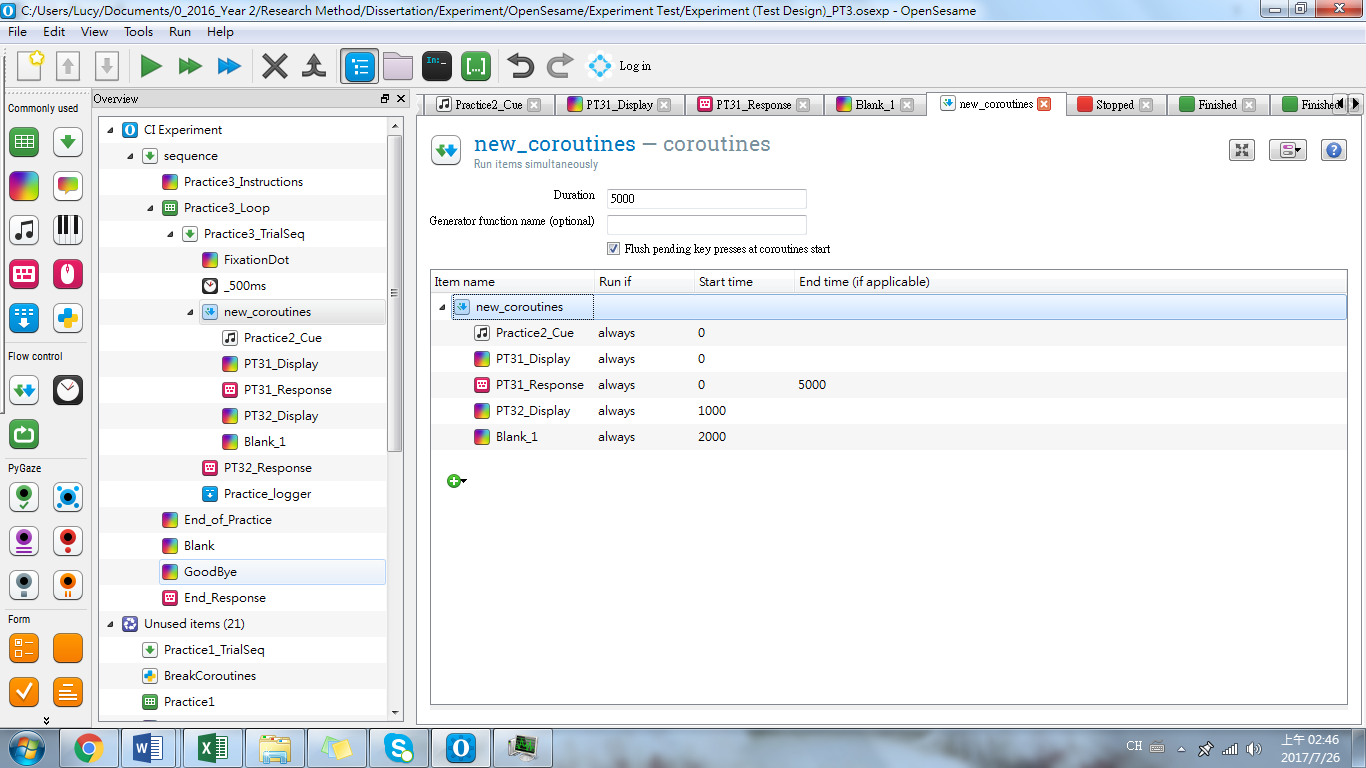
Not sure if I’m missing something here or if there’s anything I could have done differently here.
Thank you for your help in advance
YTLF
Comments
Hi YTLF,
Sorry for the late reply. Have you sorted it out by now? Unfortunately, I'm not very experienced with coroutines, but this little script below is able to handle stimulus presentation and collection in a dual-task.
Hope this helps.
i haven't tested it, but something along these lines does the trick.
Good luck.
Eduard