


Create a csv file for each log file in the experiment

Hi all,
My name is Michael Di Palma and I'm trying to approach to OpenSesame to create a mouse tracking experiment. First of all I would like to thank all the people that help us new users of OpenSesame to solve problems related with our experiments.
My problem is this: I have an experiment with three trial and three log file, for data analyzing using R software I need to get three different .csv file for each log file of my experiment.
I have tried to solve the problem using the following solution with an in-line script:
http://forum.cogsci.nl/index.php?p=/discussion/2571/multiple-log-files
Unfortunately It seems to not work, using the script I get three .csv file but only one is complete with all the variables of my experiment the other two .csv have only one raw and no variables at all.
Any ideas to how to solve the problem, Any help would be greatly appreciated!
Looking forward to hear from you soon I wish you a great day.
Greetings from Italy,
Michael
Comments
Hi Michael,
Can you share your experimental structure with us? That way, it will be easier to find out what is wrong with your code.
Eduard
Hi Eduard,
first of all I would like to thank you for your reply, here it is the structure of my experiment: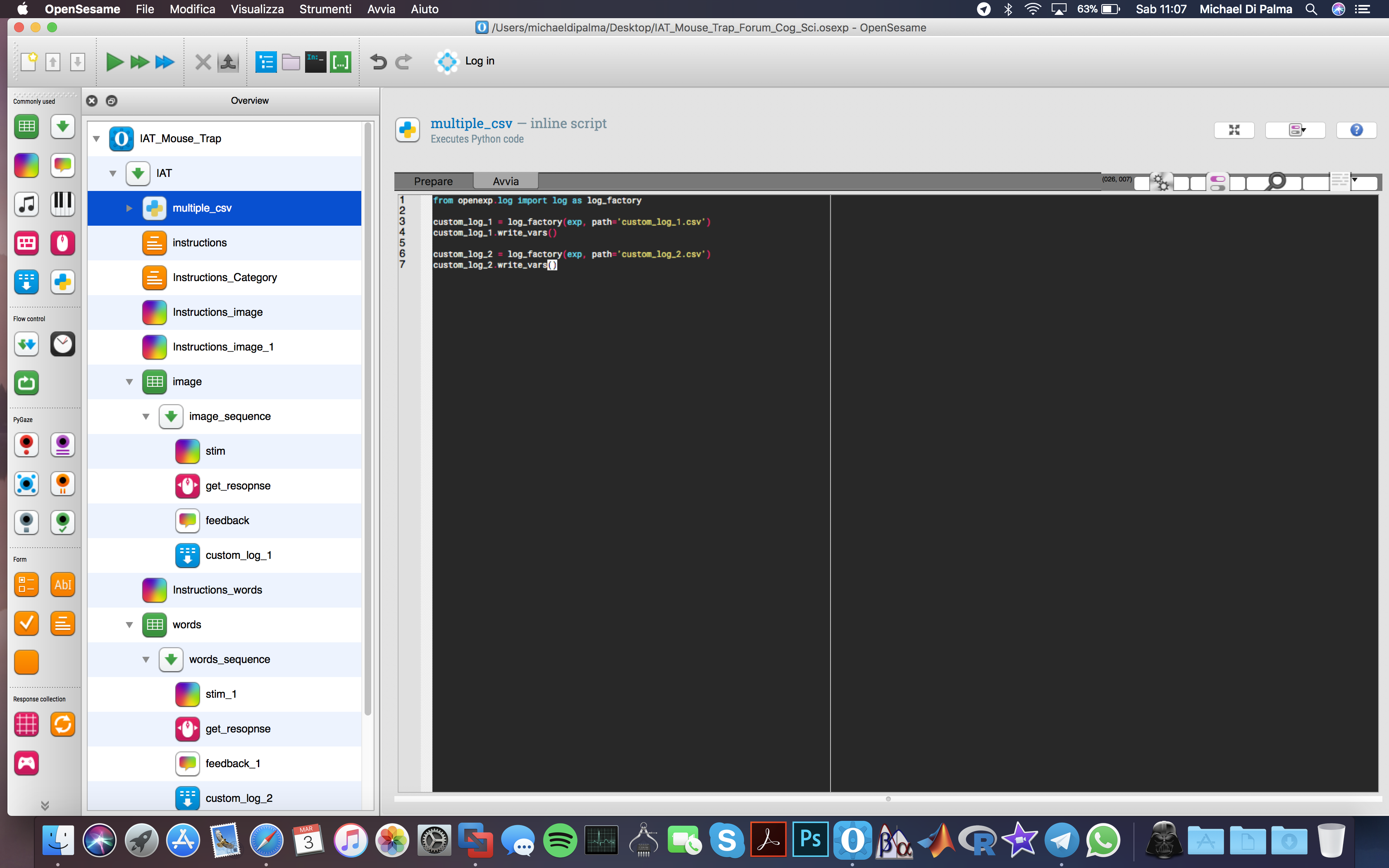
I would need to get two different csv file for each log file, as you can see I have tried to get it using a script as suggested in this past discussion http://forum.cogsci.nl/index.php?p=/discussion/2571/multiple-log-files.
Actually, when I finish an experiment I get three csv but only the first one (quickrun.csv attached) contains all the variables the other two (custom_log_1 and custom_log_2 attached) contain only the first row with some information (not the variables of the experiment) but without any data.
Looking forward to hear from you soon, I wish you a great day.
Michael
Hi,
The log objects that you create are only accessible via inline_scripts. So, you can't use the logger items anymore, but have to put an
inline_scriptwithlogfile.write_vars())in it. Does that make sense?Eduard