


Saving data from questionnaires

I am trying to make an experiment with multiple questionnaires plus a Stroop task. I am having difficulty saving the data from the questionnaires.
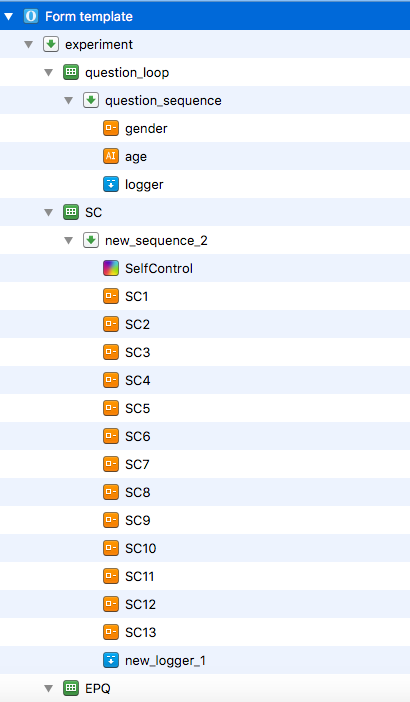
My first loop is two demographic questions, one multiple choice question asking for gender and one open answer question asking for age. These are the only questions whose data saves. However, whenever I run the experiment, Gender always pops up twice, and is reported twice.
The other loops are questionnaires with multiple choice questions. The data for these saves as NA. For example for the first questionnaire, Self Control, in Excel I see each question has a column labelled "count_SC1", "count_SC2" (etc.) plus "time_SC1" and "time_SC2", but the data in these cells is "NA".

Comments
Hi,
What worked for me in a similar case, was to manually add the variables from the questionnaire in the logger. So, in logger and/or new_logger_1, you should add each name of the variables you measure via forms. Also, you can link the logger, then it is easier to work with them, as any modification you make in one logger will automatically appear in the other, too.
Best of luck!
Hi Paula,
Thank you very much for responding! I just tried what you advised, by entering the items into the logger (see screenshots), but they then failed to appear in the Excel spreadsheet (see screenshot). Perhaps I am entering them wrong? I also tried "response_SC1" and "response_gender" but got the same result.
Could you please explain how to link the logger?
Thanks again!
Hi!
You need to check the name of the variables in the form widget (upper part). You can also check the name of your variables in the menu in VIEW -> VARIABLE INSPECTOR (my version of OS is not in English, but it should be called something like that). If you didn't change variable names, they might also all be logged in a variable called "response". More here:
https://osdoc.cogsci.nl/3.2/manual/forms/variables/
https://osdoc.cogsci.nl/3.2/manual/variables/
(If you look at the 2nd web above, you need to define your own names for "my_response_var" or see what names OS automatically provides for you.)
To link items in OS, see:
https://www.youtube.com/watch?v=_vDGpPsSqIY
Hope this works!
Hey Paula,
Yes! It was that I needed to rename the response variable.
Thanks so much!
I'm glad it worked!