


Issues with bringing JATOS online

Hi!
I have a problem with bringing JATOS online. I did everything like it was explained on the tutorial site for AWS:
https://www.jatos.org/JATOS-in-Amazons-Cloud-without-Docker.html
I signed up and chose EC2. Then I chose Ubuntu 16.04 as suggested. I also created a key pair and saved it.
Then I did login via SSH like this:

I downloaded the latest version of JATOS with Java, extracted it and changed the IP address in production.conf with nano(I just changed the IP but left 80 as it was there already):

The address with 172.xx.xx.xx is my private IPs and the one with 18.xx.xx.xx is my IPv4 Public IP address.
Then I changed Security Group in AWS like it was explained in the URL you suggested:
https://aws.amazon.com/premiumsupport/knowledge-center/connect-http-https-ec2/
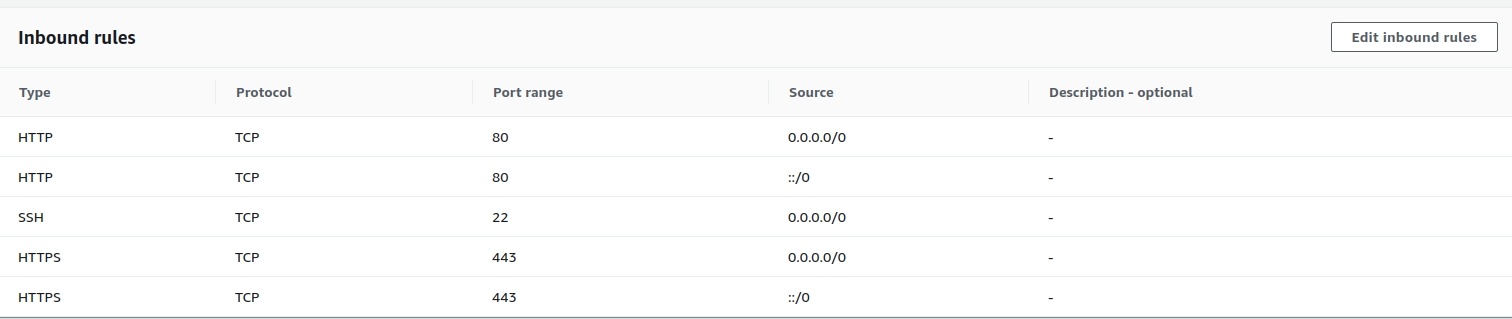
I skipped the optional step auto-start JATOS. Then I wanted to start JATOS:

And I got this message:
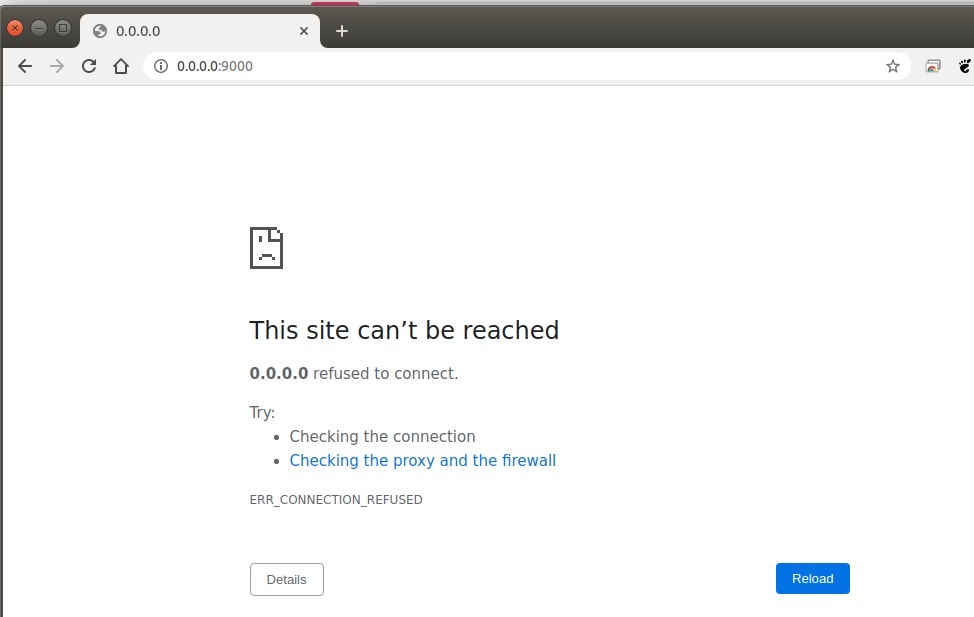
I don't have any proxy.
I have also read this thread (https://forum.cogsci.nl/index.php?p=/discussion/6061/jatos-server-doesnt-open-in-browser#latest), but I couldn't figure out what to do. I have to admit I'm not experienced in coding nor IT.
Any help would be appreciated.
Cheers!
Lukas
Comments
Hi Lukas!
Try with your public IP (this 18.xx.xx.xx) in your browser. The 0.0.0.0 is just a default configuration in JATOS to bind on any local IP that is there. Usually it works with 0.0.0.0 if your JATOS is locally installed but actually even there 127.0.0.1 (localhost IP) is more correct.
Best,
Kristian
Hi Kristian!
I've tried it with the publich IP address but the result is the same. The site can't be reached.
I've tried it out in Chrome and Firefox but in neither of them the site won't load.
Cheers!
Lukas
Hi Lukus,
I see in your screenshot from your production.conf that you did not remove the # in front of the lines of address and port. Please remove it from both lines. The # just means that it is commented out.
Best,
Kristian
Hi Kristian!
Thanks for your reply.
I did this as well. I commented it out. I've got this:
I copied this into my browser and got this:
I've tried it also with the public IP but it didn't work as well.
I don't know what else can I do.
Cheers!
Lukas
Hi Lukas,
This looks already better. JATOS starts with the correct IP and port. The unintuitive thing with AWS is that you have to use your internal IP to set up your server but access it with your public IP. Therefore in the browser you have to use your public IP. But you already tried this too and it didn't work.
Have you tested your JATOS locally? You can use curl to check if your JATOS answers at all. This should give you the login page:
Another idea: Did you open your instance 'outbound rules'. By default they are all open. Did you change them?
Best,
Kristian
Hi Kristian!
Thanks for the message.
I have tried what you suggested.
I didn't changed the "outbound rules". They are still as it was at the beginning:
The unintuitive thing with AWS is that you have to use your internal IP to set up your server but access it with your public IP. Therefore in the browser you have to use your public IP. But you already tried this too and it didn't work.
When I write the IPv4 Public IP address (18.220.46.59) then the site can't be reached. If I edit the port (18.220.46.59:80) Chrome redirects me to me private address (172.31.42.104).
Cheers!
Lukas
So it's 'connection refused'. What user did you use to start JATOS on port 80? You need some kind of root to bind to port 80. A normal user won't do.
And can you please post the content of logs/loader.log and logs/application.log?
Kristian
Hi Kristian!
Thanks for your reply.
What user did you use to start JATOS on port 80? You need some kind of root to bind to port 80. A normal user won't do.
I switched to root with
sudo -sbut it didn't connect again.I have tried the curl command in another terminal window while Jatos was trying to load in Chrome and got the following message:
The contest of logs/loader.log and logs/application.log is as follows:
Cheers!
Lukas
Hi Lukas,
So your curl output is correct (JATOS login page). That's a start.
And I can see in your logs that first you could not bind your IP and port:
2020-05-31 11:37:04,474 [ERROR] - a.i.TcpListener - Bind failed for TCP channel on endpoint [/172.31.42.104:80]
... and in the end you could (probably with a root user):
2020-05-31 15:59:02,993 [INFO] - p.c.s.AkkaHttpServer - Listening for HTTP on /172.31.42.104:80
So JATOS is running as it should. What does your public IP in the browser give you?
Best,
Kristian
Hi Kristian!
It works.
I tried it out with my public IP now. I signed in as root and copied the public IP from AWS in my browser and it worked. I hope it will keep that way.
Thank you very much for your help!
Have a nice week!
Cheers!
Lukas
Nice! You too!
Kristian