


Linking qualtrics study to opensesame task

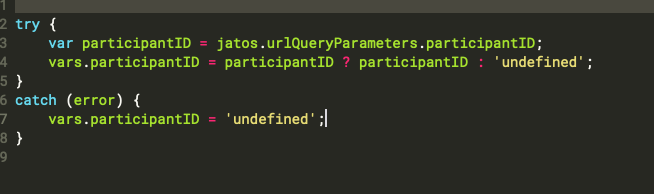
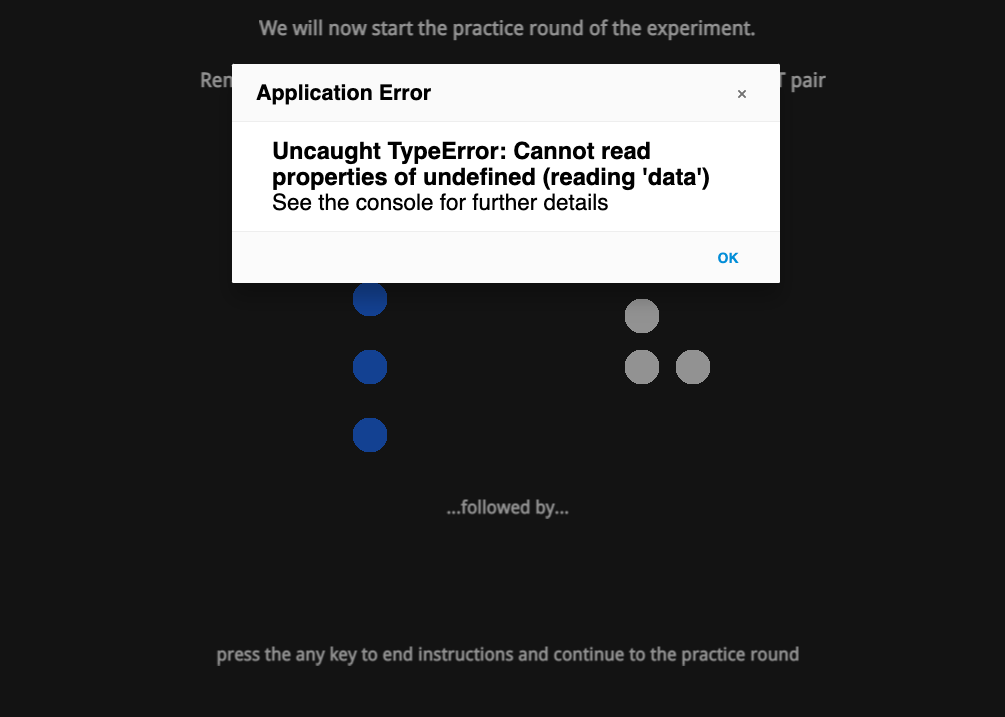
So I am working on a study were my participants take the survey portion of the study in qualtrics, and are randomly assigned to my IV, but the DV is measured in a task I created on Opensesame and hosted on JATOS. I am having an issue linking the two studies for data analysis. They work fine on their own, but when I try to use the jatos.urlQueryParameters to link a response on the qualtrics portion to the output on JATOS I get an error. I've attached the inline_javascript I am using, the error message, and what I have added to the study link embedded in qualtrics. I am new to this so any info can help!
This is what the embedded portion looks like https://jatos.mindprobe.eu/publix/3270/start?batchId=3731&generalMultiple&participantID=${q://QID50/ChoiceTextEntryValue}
Comments
Hi @oliviac,
Your code to retrieve to query the URL string through JATOS seems ok at first sight, though I'm not sure how you implement it exactly (what comes before, where you put that code, etc.).
However, are you sure the error has actually anything to do with JATOS and the code you sent above? Have you actually looked into the browser's console for more information as advised? I tried the link you sent and inserted a subject id: https://jatos.mindprobe.eu/publix/3270/start?batchId=3731&generalMultiple&participantID=test.
Here's what it says in the console:
If you're not familiar with the browser's console, I suggest you look it up. It's very useful to debug programs, or indeed to output information from the task to check things are working as you want. To open the console (and also all kinds of useful browser resources, Ctrl + Shift + J (or Cmd + Shift + J on a Mac) should work in most browsers.
Looks like you're calling for a A.png file that does not exist. Might be an error in the name you're using, might be that this A.png file is not in your pool... But if this is the same error as you get, it has in fact nothing wo do with reading information from Qualtrics through JATOS.
What you need to address is the use of A.png... Looks like you've got a sketchpad or some object referring it and that it's not there (i.e., that it's not the pool).
Hope this helps,
Fabrice.
@Fab Thank you! I was actually able to figure it out yesterday, for some reason, my task removed all of the images from the filepool.