


Separate values from multiple choice variable

Hi all!
I'm having trouble with running an analysis on JASP. I'm very new to this.
So I'm using a CSV that has values from a multiple-choice question I used on a survey. However, when I run a frequency table for the values, they're lumped together rather than separated. So what I end up with is an individual value for each of the survey answers that look like this:
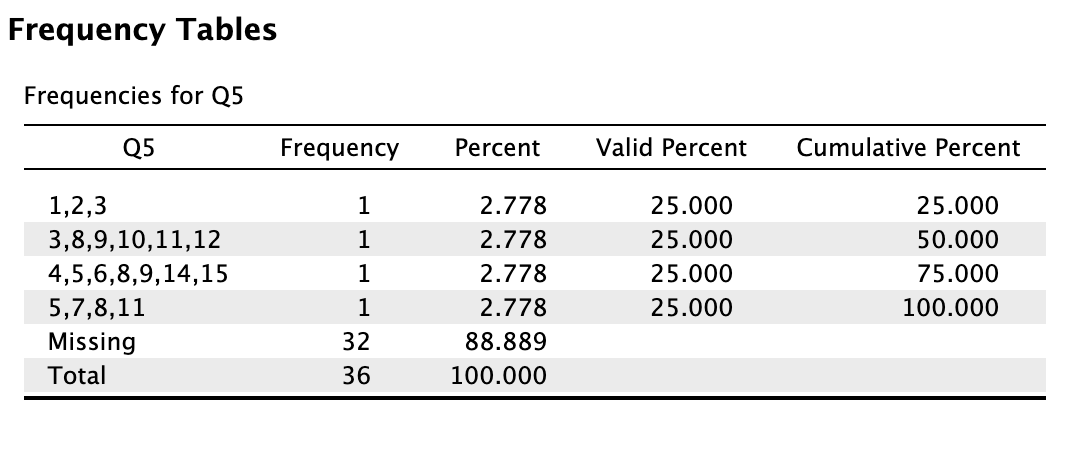
As it shows under "Q5", my frequencies only show for the combinations of the answers (i.e.: 1,2,3; or 5,7,8,11). Like this, I can't run any test on how often the value 11 is selected, for example, which is what I want to see. Instead, it lumps each of these collective values as one value. Obviously, this is a very small sample, but it's only for one of the questions.
If anyone could let me know if there's a way to separate these, I would really appreciate it!
Comments
Dear nbarden,
Yes, this means something went wrong when saving the csv. If you open the csv in Excel or Calc, say, you have different options to open it and save it; it takes some tinkering to get it right (maybe the separator should be a comma, not a tab, for instance).
Cheers,
E.J.