


Scrollbars and button positions in forms

Hi,
This is my first time trying to create an experiment in Open Sesame. I have used form_text_display to create an information page at the start of my experiment. However, a lot of information is not showing up on the screen. Is there a way I can insert a scroll bar so participants can scroll down and see the rest of the info? There is a lot missing.
Also, the button is in the middle of the text. How can I get this to show at the bottom of the page after the text?
Many thanks,
Sam
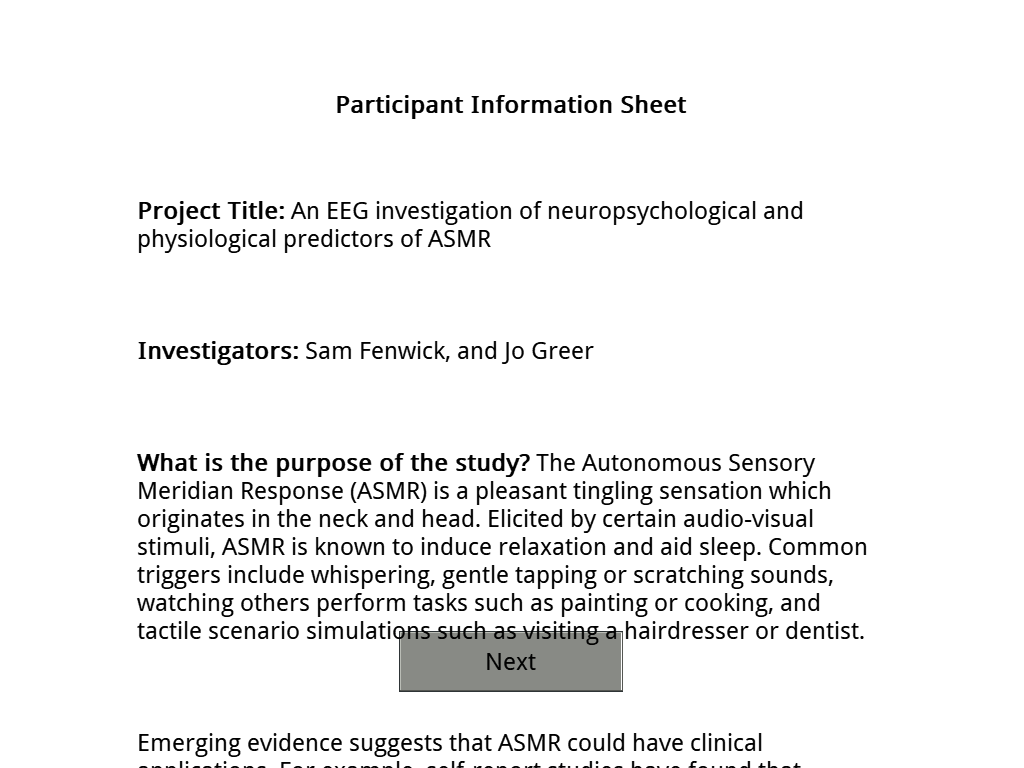
If it helps, my code is as follows:
set timeout infinite
set spacing 25
set rows "1;4;1"
set only_render no
set ok_text Next
set margins "50;100;50;100"
set form_title "<b>Participant Information Sheet</b>"
__form_text__
__end__
set description "A simple text display form"
set cols "1;1;1"
set _theme gray
widget 0 0 3 1 label text="[form_title]"
widget 0 1 3 1 label center=no text="[form_text]"
widget 1 2 1 1 button text="[ok_text]"
Comments
Hi Sam,
Is there a way I can insert a scroll bar so participants can scroll down and see the rest of the info?
That is not possible with the currently implemented features of forms. I recommend you present the information sequentially, by having a continue button or something like this.
For your second, problem I recommend you check out this part of the documentation. It explains how a form screen is built, how you can access fields in it, and design position and width of all the elements.
Essentially, you need to specify a different grid, and put the button in the lowest one. Something like that might move the button down (still, read the docs!), but because you have so much text, it will still overlap. For that you need to split it and move it to a different form
Eduard