


Sending out a marker on key-press in coroutine

in OpenSesame
Hi!
What I want is to send out both an EEG and an Eye-Tracking marker, at the time that a response (keypress) is made. However, the duration of the stimulus is fixed (1500ms), therefore I am using a coroutine. This however doesn't make it possible to send the marker directly after the keypress. Do you have an idea how to do this? I've also attached the relevant part of the experiment.
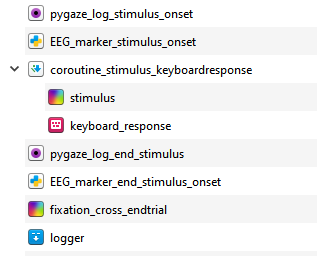
I guess I could use an inline script for this, but perhaps there is an inbuilt function that I'm not seeing? And if I would need an inline script, would something like this work?
while True:
        if var.response is not None:
            eyetracker.log_var('response') # Eye tracker marker

            send_marker(34) # EEG marker
            clock.sleep(5) # Duration marker
            send_marker(0) # End marker
Comments
Hi,
Not sure how this works with co-routines, but your while loop is a valid solution (one that I commonly use)
Here some recommendations to your while loop
kb = Keyboard()
cv = Canvas()
cv.fixdot()

stim_duration = 1500
start_time = cv.show()
while (clock.time() - start_time < stim_duration):
        var.response, t = kb.get_key(timeout=2)
        if var.response is not None:
            eyetracker.log_var('response') # Eye tracker marker

            send_marker(34) # EEG marker
            clock.sleep(5) # Duration marker
            send_marker(0) # End marker
Of course you can make it a lot more complex and add the stimulus presentation, the response, and what not to the loop. But the basic logic is correct.
Hope this helps,
Eduard
Thanks a lot! I'll try it :)