


Is it possible to delete text element on canvas without clear/draw new canvas?

in OpenSesame
Hello,
I have a problem presenting running text on a canvas with a background image. It is somehow very slow, although the image (.jpg) is only 76kb with a scale factor of 3 (to make it fullscreen 1920x1080). Does anyone has an idea how to speed up my code?
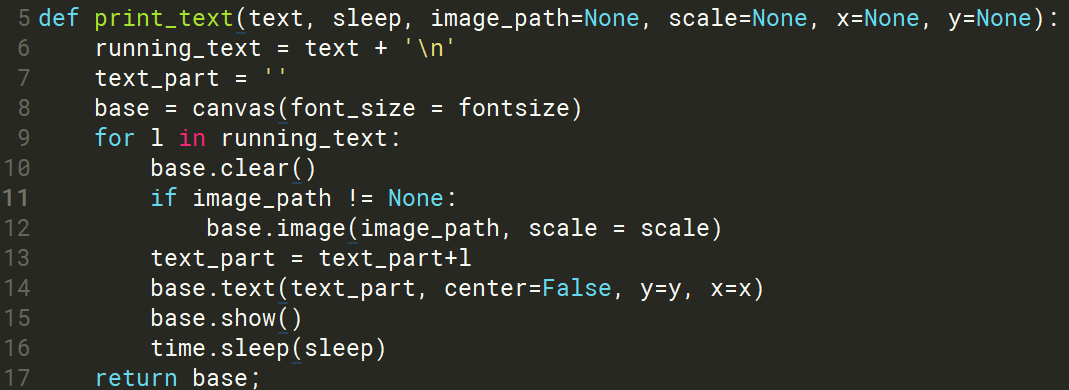

I also tried drawing a new canvas instead of clearing the old one. However, i had not a speed performance. The letters from the introduction_1 string appear very slowly on the screen and I have the feeling, that the characters further down the string are printed even slower on the screen.
Can anyone help me speed up a running text on a canvas with a background jpg? It's just the introduction to my experiment, so I don't need exact timing.
Cheers,
Lars
background1.jpg:

Comments
Hi @Lars ,
Just a quick response to your question as formulated in the title of this post: Yes, you can delete elements from a
canvasobject, but (I think) only if you named them:And then:
Whether this helps your script getting faster I cannot tell from a first glance. If you want a more detailed response, could you please copy-paste the code here? Or even better, upload the experiment?
Cheers,
Lotje
Did you like my answer? Feel free to

Hi @lvanderlinden,
Thank you very much! It is much faster!
For some reasons the text gets bigger as if it is still overdrawn. By using the clear function, the text keeps the shape, but is clearing the canvas. However, Iam satisfied with the solution. To replicate my function, use the codeblock below and run the function with some (random) text.
Thank you again!
Cheers,
Lars
Here is my function. It prints character for character on the canvas and is now very fast, even with a background picture.
def print_text(text, sleep=0, image_path=None, scale=None, x=None, y=None, imagex=None): blah = text + '\n' text_part = '' base = canvas(font_size = 30) if image_path != None: if imagex == None: base.image(image_path, scale = scale) else: base.image(image_path, scale = scale, x=imagex) for l in blah: base["text"]=Text(text_part+l, center=False, y=y, x=x) base.show() del base["text"] text_part = text_part+l clock.sleep(sleep) return base;Sorry to spam you again. The Text gets bigger, indeed, because the text element is not deleted. Can you help me solving this standalone example below?
Thank you,
Lars
Hi Lars,
I think the above script (and hopefully the other one too) works fine if you change the backend from Legacy to PsychoPy or Expyriment.
Could you try that?
Cheers,
Lotje
Did you like my answer? Feel free to

Sorry for the late response! It works!
Thank you