


Syntax errors converting JavaScript (from OSWeb script) into Python

Hello,
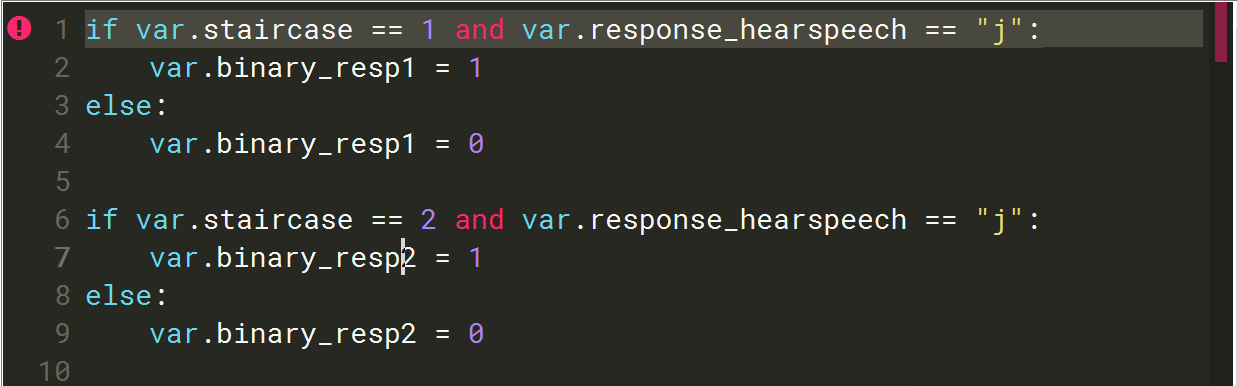
I've looked into the syntax differences between JavaScript and Python as I'm trying to adapt inline JavaScript into inline script for a new experiment in OpenSesame. However, it comes up with '[pyFlakes] invalid syntax' error but I can't figure out what is wrong with it?
Comments
Hi @Pikachu ,
Is it possible that there is an invisible character after the colon on line 1? Or that you are using a type of quotation marks that is not the regular one?
Cheers,
Lotje
Did you like my answer? Feel free to

Hi @1vanderlinden,
Thanks for your reply. There wasn't any invisible character after the colon on line 1 and the quotation marks were the regular ones. The exclamation mark error went away though after I copied, deleted and then pasted all the code again. A bit of a weird one!
Now, I have a different problem. I've got a variable named 'audio' (a .wav file), whose value is set in the main loop (or in the table of that loop) and passed to a sampler item in a coroutine. The volume of the audio is set and changes dynamically in an inline script (the option to set the volume in the sampler is disabled). However, OpenSesame can't find the volume variable (X) - it says it does not exist. I've checked the variable inspector and yes, it's not there but I'm confused as to where it's pulling X from because basically, there are 2 volumes (X1 and X2), which are among the variables in the inspector. Sorry if this sounds confusing - let me know if it would be helpful to attach the OS script.
Cheers,
Pikachu
Hi Pikachu,
I've checked the variable inspector and yes, it's not there but I'm confused as to where it's pulling X from because basically, there are 2 volumes (X1 and X2), which are among the variables in the inspector.
That part is indeed quite confusing.
Apart from that,
audiomight not be the best name, as there is a good chance, that internally some things are called audio that would be overwritten (best to avoid those kind of names, even if this specific one might not cause problems)let me know if it would be helpful to attach the OS script
That might be helpful. Best provide the entire experiment (with an example audio file attached).
Eduard
Hi Eduard,
Thank you for your reply (and for the advice - I naively named a variable 'background' once, which interfered with a built-in variable of the same name! 😅).
It's ok - all sorted now. Turns out that there was still a variable X in the script view which I neglected to update. Thanks though! There seems to be a slight issue with the metronome but I'll post in the other thread about that.