


Custom variables only log NA values

Hello everyone,
I have been struggling to get custom variables to save correctly.
In this experiment, participants see a central dot with a large ring around it (as though on a clock face). At the beginning of each trial, they hear a number from 1 to 12, then they need to click consecutively on the central dot and then on the area of the ring where the number would be located (on the clock face).
I need to collect time and location of the onset and the release of the two click events. For the RT data, I was able to add my custom variables directly from the variable list (e.g., "response_time_click_central", etc.). In the source(s) columns of the logger object, I can easily see where every variable is being recorded from (in this example, the "click_central" mouse response).
For the location data, I added three variables ("cursor_roi", "cursor_x, cursor_y") from the list, but in the column "source(s)", all four events are listed for these variables, such that only one value for cursor, one for x and one value for y are logged in each trial.
I have tried to get these variables to log "manually": First, I have initialized the variables in an inline_script object before the experiment loop.
set description "Executes Python code"
___run__
cursor_x_click_central = 0
cursor_y_click_central = 0
cursor_x_click_ring = 0
cursor_y_click_ring = 0
cursor_x_release_central = 0
cursor_y_release_central = 0
cursor_x_release_ring = 0
cursor_y_release_ring = 0
__end__
set _prepare ""
Then, after each mouse response event, I have an inline_script object in which the variables should be set to values (see screenshot).
set description "Executes Python code"
___run__
cursor_y_click_central = var.cursor_y
cursor_x_click_central = var.cursor_x
__end__
set _prepare ""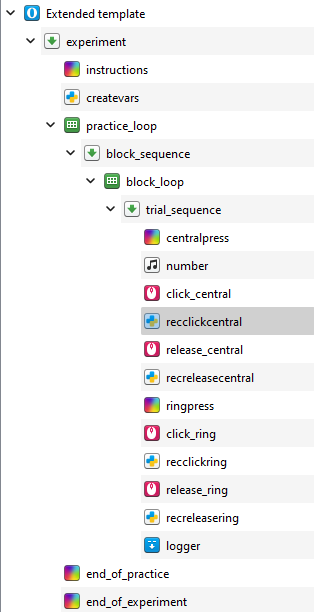
Last, I am recording these variables in the logger:
# Define a function to log the cursor data
set description "Logs experimental data"
set auto_log yes
log numberfile
log time_click_central
log time_click_ring
log time_release_ring
log time_release_central
log response_time_click_central
log response_time_click_ring
log cursor_x_click_central
log cursor_y_click_central
log cursor_x_release_central
log cursor_y_release_central
log cursor_x_click_ring
log cursor_y_click_ring
log cursor_x_release_ring
log cursor_y_release_ring
log cursor_y
log cursor_x
log cursor_roi
When I run the experiment, all RT data are recorded correctly, but the only location data logged are the (non-customized) variables cursor_roi, cursor_x, cursor_y. The custom columns are created in the resulting dataset, but all values are NAs.
Any help would be greatly appreciated! 😅
Thank you in advance!
Carlotta
Comments
Hi Carlotta,
In all inline_scripts, change what you have to
Does this help?
Eduard
Thank you so much Eduard! This solved the problem!!! :D