


Emotions Wheel

Hi,
I am trying to create an emotion recognition task using OpenSesame. Participants will be asked to watch videos and indicate the emotions that were showed during the clips. To do this, I would like the 14 emotions they can choose from to be presented in the form of an "emotions wheel" (as shown in the picture). As I am learning to use Opensesame and getting familiar with python, I am having trouble figuring out which script to write to achieve this result.
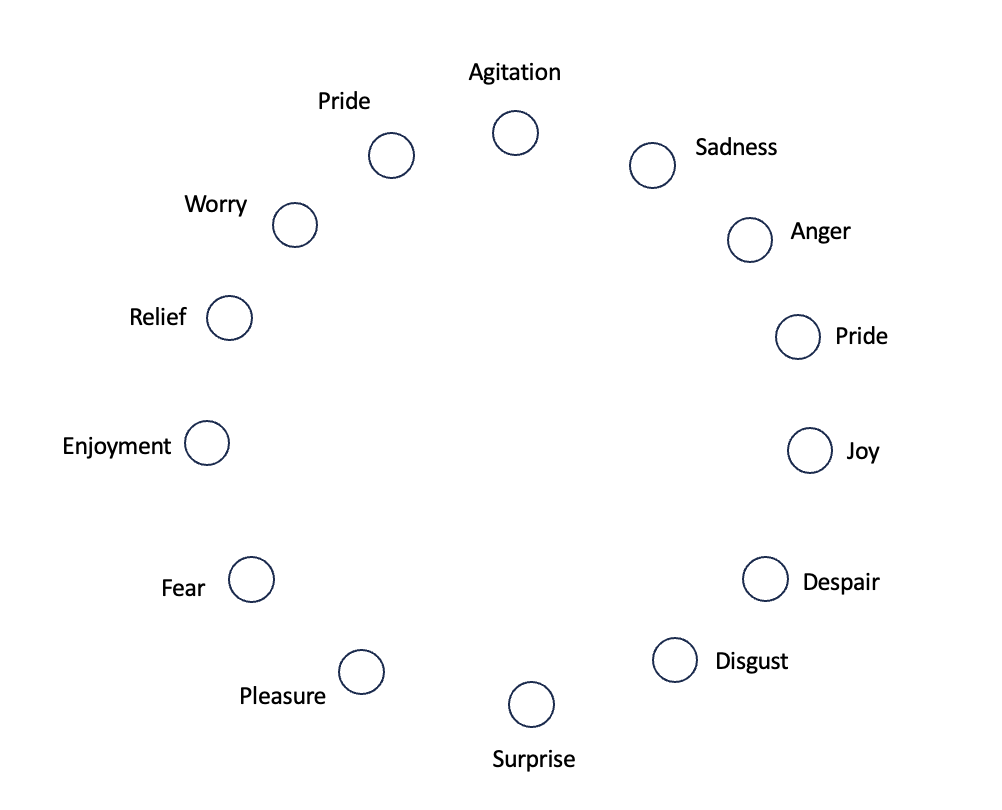
I found these two posts giving me hints for a solution but I don't understand the scripts :
Could someone explain them to me? What functions could I use to create the emotions wheel? Thanks in advance for your help,
Ingrid
Comments
Hi @Ingrid_D,
That falls somewhat outside the remits of the forum. My recommendation would be to take some time to read up about some of the basic methods in Javascript such as functions, arrays,
If you do so, the following code will make more sense:
function choice(array) {
array = array.slice()
let counter = array.length;
while (counter > 0) {
let index = Math.floor(Math.random() * counter);
counter--;
let temp = array[counter];
array[counter] = array[index];
array[index] = temp;
}
return array[0]
}

vars.color_circle_rotation = choice([0, 60, 120, 180, 240, 300])
The provided code snippet consists of a JavaScript function named
choiceand a line of code that uses this function. Let's break down each part for a clearer understanding:Function:
choice(array)array, which is expected to be an array.array = array.slice(): This line creates a shallow copy of the input array. This is done to avoid modifying the original array passed to the function.whileloop, which continues as long ascounter(initially set to the length of the array) is greater than 0.let index = Math.floor(Math.random() * counter): This line generates a random index within the range of the unshuffled portion of the array.counter--: Decreases the counter, effectively reducing the range for the next random index.counterindex with the element at the randomly chosenindex. This is a standard technique for shuffling an array (Fisher-Yates shuffle).return array[0]).Usage:
vars.color_circle_rotation = choice([0, 60, 120, 180, 240, 300])choicefunction with an array of numbers[0, 60, 120, 180, 240, 300].vars.color_circle_rotation. This suggests that the function is used to randomly select a value from the provided array, possibly for some kind of rotation value in degrees (as indicated by the variable name and the values in the array).In summary, the
choicefunction is a utility for randomly selecting an element from an array by shuffling the array and returning its first element. The usage example shows it being used to select a random rotation value for a color circle.I recommend you follow the same process with the rest of the code. For example. to understand the line "let distance =Math.sqrt(vars.cursor_x * vars.cursor_x + vars.cursor_y * vars.cursor_y)", I'd recommend looking up what the "let", and "Math.sqrt" functions do. It takes a little time but it's the best way to learn and eventually get in control of your code.
Best,
Fabrice.