

Browser(s) seem to unpack .osexp archive resulting in a Failed to open file error

Hi all,
Guess this isn't a problem in OpenSesame but is does effect .osexp files so I thought I post it here.
When downloading an .osexp file that has something in the file pool so it's an .tar.gz archive and not a plain-text file (more info), some browsers seem to unpack the .tar.gz archive. This can result in the following error when opening the .osexp file in OpenSesame:
Failed to open file

item-stack:
exception message: 'utf8' codec can't decode byte 0xd2 in position 3526: invalid continuation byte
time: Wed Sep 28 12:36:36 2016
exception type: UnicodeDecodeError
For example the experiment at the URL below gets unpacked when downloading with Firefox (v49.0.1 on Win7x64):
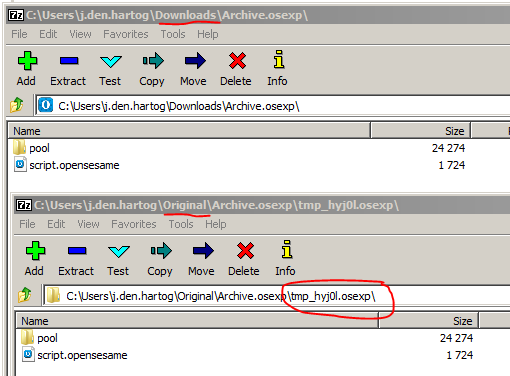
When opening both the download and the original experiment you can clearly see the difference (some 'in between' .osexp file) with 7-zip:
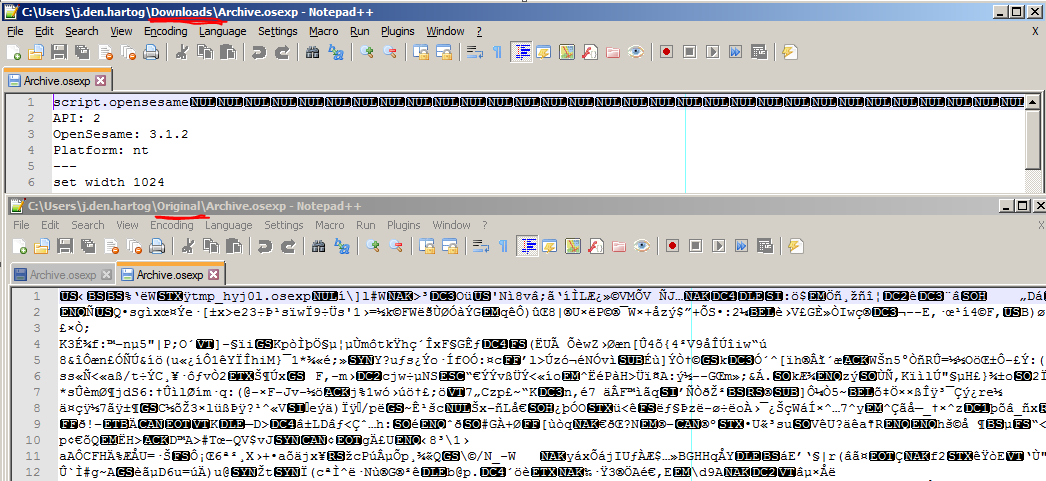
One can also clearly see the difference by using a plain-text editor like Notepad++
Internet Explorer (v11 on Win7x64) doesn't do this (for the URL provided above) but you will have to Save as or rename from Archive.tar to Archive.osexp.
Hope this is of some help to someone 
Best,
Jarik
Comments
Opera does this too. The result is so weird.
You get some .gz data which you shall unpack. The result is an empty .osexp file.
Hi Jarik,
Thanks for the clear explanation! It puzzled me for a minute, but here's what I think is going on:
.osexpfile is really a.tar.gzfile, meaning it has been compressed twice: first to a.tarand then again to a.gz. This is a traditional Unix compression technique..osexpfile has become a.tarfile, meaning that the browser has extracted the first.gzcompression layer.So the browser automatically unpacks the file after download, corrupting it in the process. Why?
Well,
.gzis also used to reduce bandwidth when downloading large files, in which case the automatic extraction is necessary (because you don't want to download a regular file and end up with a.gzarchive). To see whether the.gzcompression is only for bandwidth reduction, or really a part of the file, the browser looks at the header that is sent by the webserver. And when the webserver sends the wrong header, the downloaded.gzfile is wrongly extracted. So the problem seems to be with the webserver, and not with the browser nor OpenSesame. But it may affect a lot of webservers, so it's still a problem.I'll think about the best way to deal with this. The easiest solution may be to simply allow
.tararchives in OpenSesame as well.Cheers!
Sebastiaan
Check out SigmundAI.eu for our OpenSesame AI assistant!
Not that it solves the issue, but to be on the save side, I usually wrap my .osexp files in .zip files before sending them around via email.
Eduard