

Some issues with OSWEB

I've recreated a fairly rudimentary task switching experiment in OpenSesame. The file can be found here: https://drive.google.com/file/d/1jha0pOok3sDFyUsOZUCvpun--7nAC4cv/view?usp=sharing
The esperiment runs well while launched from OpenSesame but whenever I try to run it on OSWEB, I get the same error:
`Uncaught TypeError: Cannot read property 'width' of null
See console for further details`
The console looks like this:
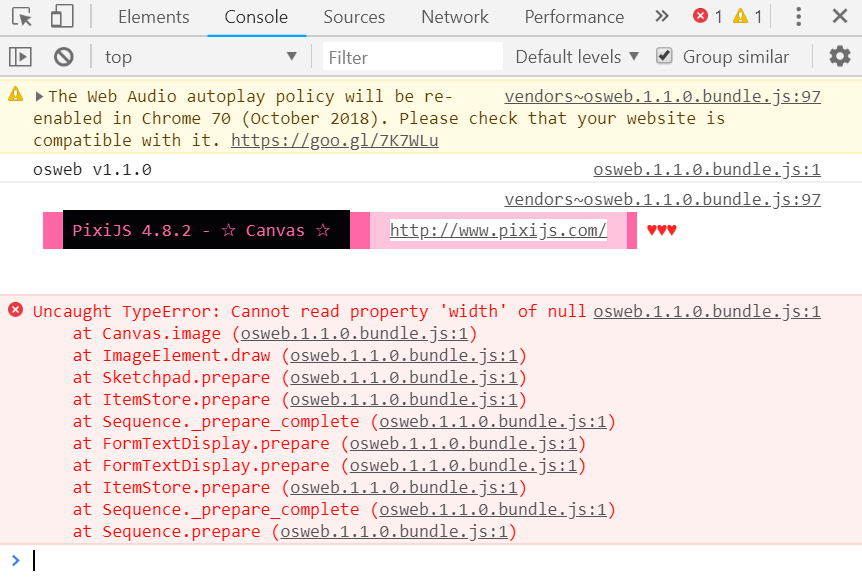
I've investigated to the best of my ability but I'm not really sure what's causing the error. Any ideas?
Comments
Hi Surya,
Thanks for giving OSWeb a shot! As you've probably seen (but just in case), OSWeb is still under development so we don't recommend using it in production. But of course we're keen to fix any bugs.
Regarding the crash. Only a limited number of items is supported by OSWeb, and the
form_text_displayisn't one of them. However, that doesn't seem to be the only issue, because the error persists even after removing the forms. I'm pinging @Daniel to see whether he can shed some light on this.Cheers!
Sebastiaan
Check out SigmundAI.eu for our OpenSesame AI assistant!
I'll have a look at this soon!
Fixed in v1.1.1
The culprit was the file extensions of the image files in the pool being uppercase. This caused them to not be correctly recognized and processed as images. I made the extension check case-insensitive and now the experiment runs nicely, in my browser at least.
And as a sidenote:
form_text_displaydoes already workThanks very much for the help @Daniel and @sebastiaan ! That seems to completely fix the issue. One quick question: How would you save the acquired data? I've noticed that there is output in the console but is there a more elegant solution other than saving the console output?
Good!
We do not (currently) offer a server for logging. However, if you have a web server, you can install JATOS, and run OSWeb experiments from there, as described in the documentation:
Check out SigmundAI.eu for our OpenSesame AI assistant!
I followed the instructions presented on the link above but I keep gettig this error in OpenSesame when I try to export the study as a JATOS zip file:
Traceback (most recent call last): File "C:\Users\surya\Desktop\Opensesame\opensesame_3.2.5-py2.7-win32-1\share\opensesame_extensions\oswebext\oswebext_widget.py", line 103, in _export_jatos description=self.experiment.description File "C:\Users\surya\Desktop\Opensesame\opensesame_3.2.5-py2.7-win32-1\lib\site-packages\osweb\export.py", line 72, in jatos js_sources File "C:\Users\surya\Desktop\Opensesame\opensesame_3.2.5-py2.7-win32-1\lib\site-packages\osweb\export.py", line 149, in _html fd.write(html) TypeError: write() argument 1 must be unicode, not strPerhaps this is some issue with what is being passed to the write function?
Here is some info:
Hi Surya,
There was a bug with Python 2 in the extension. I just pushed a bug-fix release to PyPi (1.1.2.1). Could you try updating and see if this resolves this issue?
Cheers!
Sebastiaan
Check out SigmundAI.eu for our OpenSesame AI assistant!
Hello!
I am testing my first online experiment and am getting the same error in Chrome
Could you help me? Thanks a lot!
@Katharina You can find the latest release of OSWeb as part of OpenSesame 3.3. Before we focus on debugging this, could you verify whether the error also occurs with OSWeb 1.3.5?
If you're already using OpenSesame 3.3, then you can update OSWeb by running the following in the terminal:
conda update opensesame-extension-osweb -c cogsci -c conda-forge -yCheck out SigmundAI.eu for our OpenSesame AI assistant!
I am having a similar issue (running OpenSesame 3.3 and OSWeb 1.3.7). Whenever my script runs into the first instance of a form_base, it crashes.
The console of my browser basically says the same thing as the user users reported:
DevTools failed to load SourceMap: Could not load content for User/AppData/Local/Temp/vendors~osweb.1.3.7.bundle.js.map: System error: net::ERR_FILE_NOT_FOUND
DevTools failed to load SourceMap: Could not load content for User/AppData/Local/Temp/vendors~osweb.1.3.7.bundle.css.map: System error: net::ERR_FILE_NOT_FOUND
I guess it has something to do with the form_base, but I don't really know how to fix it (or if there's a way to fix it).
@trig, these messages are harmless and should not affect the internal functioning of osweb. They are only useful for debugging.
@sebastiaan, did you also copy the .map files to the new osweb release last time? They are not a strict requirement, but this enables users to give better line no. etc when experiencing errors and copying stacktraces from the console.
@Daniel: Okay, thanks. But the experiment crashes nevertheless whenever I want to use a form_base which includes a scale. Is that not supported and I'll need to find a workaround or do you have any advice how I can make that work in the OSWeb context?
Hi @trig,
form_base indeed is currently not supported, and there is no easy workaround to add form functionality to Osweb. Sorry for not being able to offer more help.
@Daniel Ah, no worries. Presenting an image display and collecting single responses to questions should also work fine. Also, are inline_scripts not at all supported for OSWeb or is their functionality just limited? Thanks in advance.
Hi,
Inline_scripts are not supported in their python implementation. However, you can use a javascript inline_script instead. This means that you have to translate your code to javascrip, and, if I remember right, not all functionality can be ported. See here: https://osdoc.cogsci.nl/3.3/manual/osweb/#inline-javascript
Good luck,
Eduard
Awesome, thanks for this tip!
Hi there,
Let me ask here instead of starting a new thread.
Where are the log files for running OSWeb locally stored? It is probably a lame question so I didn't see it asked before, but I really can't find them.
Thanks,
art
Hi @Art ,
When you run OSWeb in a browser locally (i.e. a test run), then the result are only printed to the browser console, and not stored in a local file. This is not intended for data collection, only for testing!
— Sebastiaan
Check out SigmundAI.eu for our OpenSesame AI assistant!