

Collecting responses while stimulus remains onscreen OSWEB

Hi,
I want to display a stimulus in a sketchpad, and limit the response time to 2500 milliseconds (using a keyboard response). But - i wants that after the subjects response (by a keypress) the stimulus will still appear on the screen.
In the past it was possible using coroutines, but this feature is not supported in OSWEB.
Does anyone have any suggestion on how to make this happen in OSWEB as well?
so far i have tried this sollution (without much success):
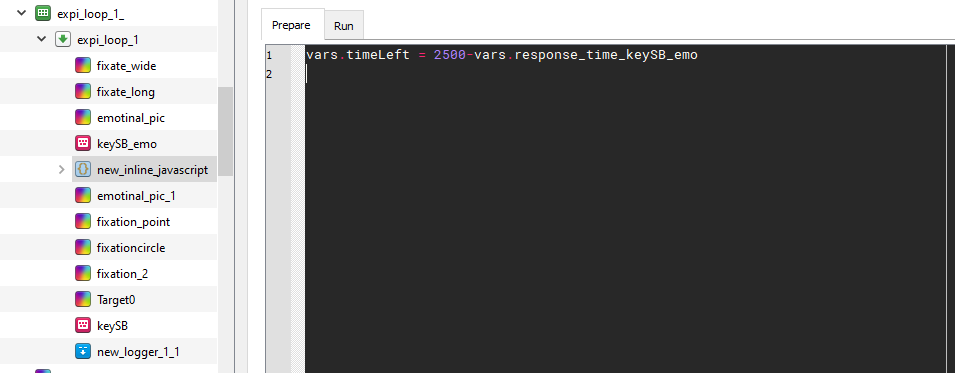
In the first sketchpad (emotinal_pic) the subject response useing a keypress (keySB_emo with timeout of 2500 milliseconds), then another sketchpad appears (emotinal_pic_1) for a time (timeLeft) that depends on the response to the previous stimulus (emotinal_pic).
When I run the code i get an error: time can not be negative (I also tried to put it at an absolute value, and it still does not work).
Any ideas?
Thanks!
Comments
Hi @rotemB1 ,
At first glance, your approach seems correct, but you should determine
vars.timeLeftin the Run phase of the script, because this needs to happen after the response has already been collected.There's also a rudimentary implementation of
coroutinesin OSWeb, courtesy of @Daniel , so you can try if this works in your specific case. But no guarantees—coroutinesare not officially supported! (As the compatibility check will also tell you.)— Sebastiaan
Check out SigmundAI.eu for our OpenSesame AI assistant!
Hi Sebastiaan,
Thank you for your answer!
I've tried both of your solutions,
Even when i determine vars.timeLeft in the Run phase i get the same error: time can not be negative
When i set the timeLeft variable as a function of the response time (only "vars. respone_time_keySB_emo"(removing "2500-")) i get another warning, that this variable is not found. I think that i do not access this variable in the right way (like opensesame doesn't know which variable it is). How can i solved this?
Regarding your second suggestion, i tried it and it workes! but, whan i upload the experiment to Jatos the background of the emotinal_pic (inside the coroutines ) changes into black (in opensesame its white). i tried to "set background white" but it still does not work.
I will be happy if you will have a suggestion for me
Thank you!
update:
after digging around i see that i cannot access a variable that i define in run time only to those who i define in the prepare script, thing is the 'Duration' i want to set to my sketchpad is based on a value that i know only in runtime, any ideas how can i do so?
Could you use a feedback item? They are virtually identical to sketchpads, except that they are produced in the run phase rather than the prepare phase.
See here:
Eduard