


Movie (media_player_mpy) not playing

hi,
I'm new to Opensesame and am trying to play a movie file (1-2 second duration).
I'm using OpenSesame 3.3.6 on a Mac OS X 10.15.
I have tried this with an AVI file and a mp4 file both with the same results.
I can't work out if I need to set the 'Call custom Python code' to "on keypress" or to "after every frame".
If I set this to "on keypress" I can run the task and at the point of the sequence where the movie should be I get a brief flash of a black box, and then the sequence continues.
If however I set the Call custon pythod code to "after every frame", as soon as the sequence reaches the movie, i get a black box image and then the task crashes with the following message:
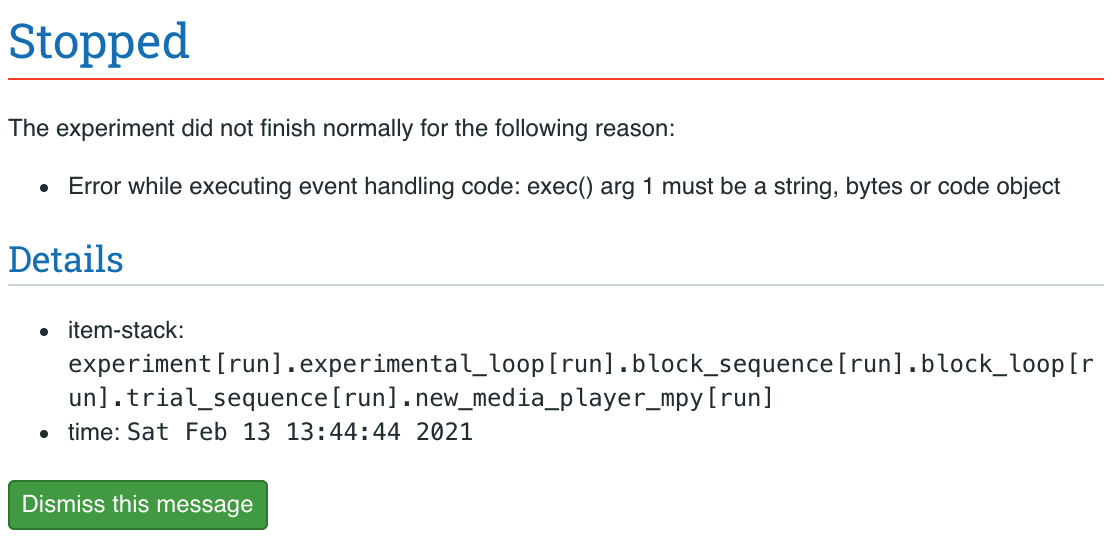
(actually, I got a much longer and different error message when trying this with an mpeg file)
I have just found a discussion post that indicated I might need to install a plugin (the folder at the below location was empty, so I've now manually downloaded the ffmpeg.os file and put in this folder:
/Users/<your_username>/Library/Application Support/imageio/ffmpeg
Any help would be much appreciated!
Robin
Comments
Hi @rlaycock ,
I'm tagging @Daniel ; Daniel, could you perhaps have a look at this?
Cheers,
Lotje
Did you like my answer? Feel free to

Hi both,
I tried to reproduce this, but I do not get this error. I do think the problem description is incomplete though, because you do not directly mention it, but I distill from your description that you are trying to run custom python code in the movie player? I tried to do this too (just a simple
print()statement) and this still worked, so you must be doing something else in the event handling that causes this error. If the movies are small, can you share this experiment so I can try to run it?Hi @Daniel,
many thanks for having a look. You are correct that i also have some inline scripts in the task (to run some triggers), though not linked to the movie itself.
I've attached my task - please let me know if I need to send anything else to allow you to test this. Thanks so much!
Robin
Hi @rlaycock,
Thanks for sending the experiment. I have to find some time to check this out, but I will hopefully be able to do so this weekend.
HI @Daniel, I've been a bit busy but just returning to this. I think you might've been very busy also :)
I wonder if it's possible to get these videos working?
Thanks!
Hi @rlaycock,
Sadly I haven't been able to look at it yet. I'm in a really busy period at the moment. Hope to find some time soon!
Hi @rlaycock, I just came across this exact same error message when trying to run a video and found the solution is as simple as setting the Call custom Python code to "on keypress" in addition to setting the backend to legacy. Hope that helps you out!
Cela
Hi Cela,
Thanks for sharing!
Hi @cela thanks for the message. Yea when I change to "on keypress" I no longer get the error message and the task runs fine.. except that instead of playing the video it just flashes maybe 1 frame of the video box (it's all black) and then keeps going. So no video plays!
I've tried a couple of video file types, but maybe it is a problem with my video rather than OS..
Hi @Daniel
Because of other commitments this project has been on hold, but I'm now looking to see if i can get my videos to play. Is it possible to take a look some time soon?
Many thanks.
Hi, I'm just updating this discussion, just in case there are some other solutions I'm not aware of.
I've been able to use Expyriment as the backend, and then setting the call custom Python code to "on keypress", and my movies play fine (using media_player_mpy). This also worked with Legacy as the backend as mentioned above.
However, I am running this task while recording with fNIRS and need to display the task on a second monitor (so that I can monitor the fNIRS trace on my laptop). I've discovered that there is no option for a second monitor using Expyriment (or Legacy). I would have to use Psychopy, as this has the option for selecting a different monitor. But then I'm back to where I started, with the media_player_mpy not able to play my videos.
Hey rlaycock,
maybe what I am saying is nonsense, but if frame rate is not a big concern to you, could you try to extend your screen, i.e. pretending it is one big screen, and adjust the coordinates of experiment such that it will be presented on the 2nd screen only?
Alternatively, you could always try a different mode of video playback. Personally, I had good experiences with OpenCV.
Hope this helps,
Eduard