


Sending triggers to Biosemi

Hi,
I'm preparing to run an ERP study that requires sending triggers to a Biosemi Actiview system at specified points throughout the study. My PC is connected to the BioSemi system through its parallel port converter cable, which converts a parallel port to a regular USB port.
However, OpenSesame's parallel port plugin doesn't seem to recognise this connection, as technically, I suppose it is a connection through a regular USB port. Perhaps another complication is that I'm on Ubuntu Linux, so can't use the Windows-only parallel port options.
So far, I've tried the following:
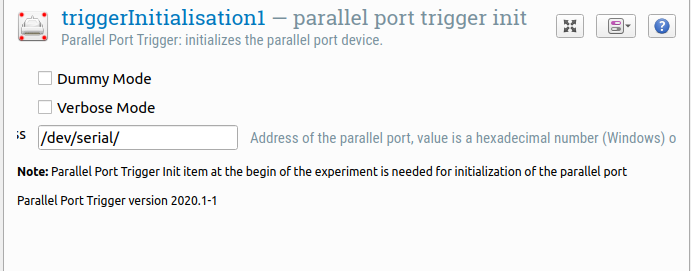
This returns the following error when trying to start up the experiment:

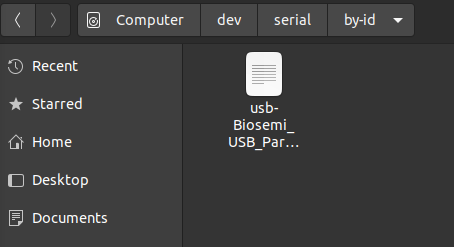
Similarly, changing the path to /dev/serial/by-id or /dev/serial/by-path results in the same message. This surprised me, as my system tells me this is where the connection is located:
I also tried /dev/ttyUSB0 as I was suggested this may be where the connection is located as well:
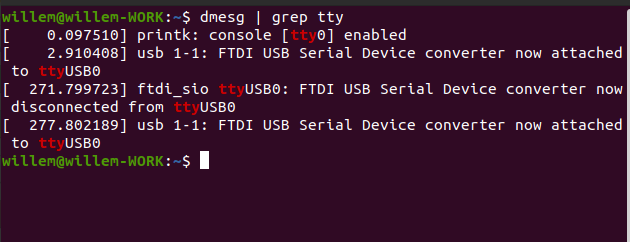
This didn't work either, and neither did /dev/ttyS0 or /dev/ttyS1, or any of those, really!#
So, this means I'm officially stuck -- would really appreciate suggestions from people who have encountered this problem themselves.
Just for reference, I do have access to a Windows installation so would be able to switch to Windows if necessary. If the problem is Biosemi's parallel port converter, though, this probably wouldn't help.
Thanks a lot!
Willem
Comments
Hi Willem,
Unfortunately, I don't have experience with Biosemi's parallel port to usb connector. However, probably it would make sense to first remove one layer of complexity and don't use the Parallel port plugin. Instead, you can try to use plain python to access the port. Also, you might be luckier on the web to find help on that particular issue, than on help wrt to some niche toolbox.
Sorry for not being able to help any better. In case you figure it out, it would be great if you could post the solution here.
Eduard
@eduard so, after a lot of wrangling over the weekend I finally found a fairly easy solution to my problem. Thought I'd share for anyone else who runs into this.
First things first, with Biosemi, do not use the parallel port plugin. It won't work, as the Biosemi port converter *doesn't count* as a parallel port any longer, it's a serial port instead.
Given this, using the
pyserialtoolbox, which comes with OpenSesame, is the straightforward solution.1) First off, make sure
pyserialis installed and not just the python moduleserial. On ubuntu, enter a terminal and first uninstall the serial module usingsudo pip uninstall serial. Then, make surepyserialis installed withpip install pyserial. This can cause some hassle, so have a fiddle around if it doesn't work for you instantly.2) In Ubuntu, you now need to give yourself access to the serial port in the first place, otherwise nothing will send through it. Do this in a terminal by adding yourself to the '
tty' group,ttybeing the Ubuntu code for serial ports. Typegroupsin a command prompt to see the groups you are already assigned to, andcompgen -gto see all groups. Add yourself to thettygroup usingsudo usermod -a -G tty username.Some people have reported they also need to give themselves access to thedialoutgroup, so add yourself to that group as well.3) You're going to send triggers through inline scripts, so place these wherever you want a trigger to be sent (Note: if you're using a sketchpad with a duration of 0 like me, place your trigger script before the sketchpad. Also add an initialisation script (mine was called
triggerInit) at the very start of your experiment, containing the following code:import serialImport the serial module.
import serial.threadedNot even 100% sure if this one is necessary, but import a threading extension to the serial module as well.
port = serial.Serial('/dev/ttyUSB0', baudrate = 115200)Now define the port you want to send your triggers through. For me, this was ttyUSB0, but this will vary in your system. Optionally, set the baudrate.
port.timeout = 1Make sure that the right port is selected, otherwise time out the command.
port.flush()Clear the port of any information so far.
4) Now, in your trigger-specific scripts, you need to tell OpenSesame to send the correct bits of information through the serial port. If, like me, you have conditional triggers that are defined in your block, the code for this is as follows:
triggerID = self.get("triggerID")- where "triggerID" is the name of your trigger column in your blockport.write(str.encode(chr(triggerID)))- these conversions throughstr.encode()andchr()seem to be necessary for Biosemi to receive the information and process it through to the EEG system.And that's it! Your triggers should now process through the Biosemi parallel port converter and into your Biosemi EEG system. This took me a while to figure out so I don't know if I'd be much help if anyone has any questions, but feel free to ask!
Willem
Hi Willem.
Awesome! Thanks for sharing
Eduard