

How to change script editor color?

After I download the new version of Open Sesame, suddenly my script editor not showing the colour as usual. It only showed white text and not a colourful one. How do I get rid of this, I tried to change the references option but it still not changing, and also the text editor kind of missing after the update. Thank you
Comments
Hi Bernard,
Could you provide more information? From which to which version did you upgrade? Which item specifically do you talk about? Sketchpads? Or any items?
I also don't have colors in the Opensesame scripts, but I also haven't had them in previous versions. Or do you refer to inline_scripts? There I still have nicely formatted code.
and also the text editor kind of missing after the update
What exactly do you mean? What is the text editor? and what is "kind of missing"?
Thanks,
Eduard
Hi Edward, Thanks for your thoughtfulness,
This is my old version of open Sesame. It has code editor/general script preferences on the right side. (This image capture from my Institution Laptop)
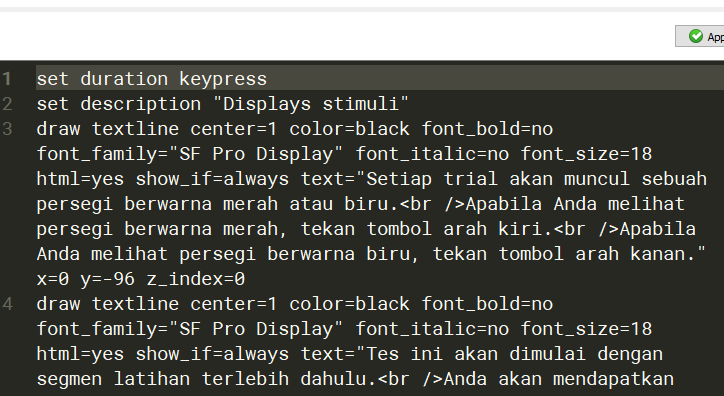
And after the update, this happened.
Don't get me wrong; it is kind of not a big deal, though. But if your version doesn't have text color in the code editor, probably my old version just an anomaly, and I'm used to love the old code editor.
Thanks
Aji
HI Aji,
Are you sure you are updating from 3.3.1? Because in your screenshot it says, Opensesame version 3.2.8
(3.3.1 I dont have colors in that version either).
I have a similar query to Bernard (I'm running Open Sesame 3.3.10). if there's a setting to activate the color coding of the script it'd be very useful. Again, like Bernard says it's not a big deal but in my case it's a handy guide when demonstrating the program to students.
Hi Mike,
As far as I see, there is no option to set the color of the Opensesame scripts. I suspect that happened in the process of introducing Rapunzel as basis for the inline_script. But maybe @sebastiaan knows a trick to activate the color of the script?
Sorry,
Eduard
Hi @sebastiaan,
I heard from some more people that this is a problem. So, there is no color coded syntax in items (not the inline_coder I think). Do you have any idea whether this is a bug or just a setting?
Thanks,
Eduard
@eduard This is indeed related to the switch from QProgEdit to PyQode as the library for the editor components. PyQode doesn't have syntax highlighting for OpenSesame script. So it's not really bug, and also not a setting, but simply functionality that hasn't been implemented yet. It's on the radar though!
Check out SigmundAI.eu for our OpenSesame AI assistant!
Ah, great. Thanks for getting back on this!
Eduard