

Coroutine Reaction Time

Hi,
I just finished my experiment with participants measuring their reaction time in a dot probe task. However, in the output I noticed a weird thing with the response times. Too many of them are suspiciously low.
I think it might have something to do with the coroutine i'm using. When I run the experiment with coroutines vs without coroutines, theres a systematic difference. Left side with coroutine, right side without...
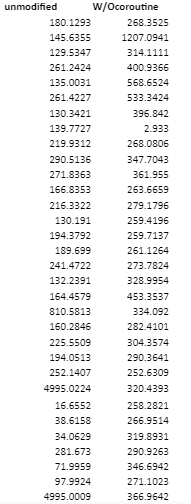

My question is what's causing this difference? Is the reaction time reset when the coroutine starts? Is this "preparation time" random or is there a fixed time for the coroutine to start? Or is this caused by something else completely.
Fixation: 995 ms
facestimulus: 295 ms
Really hope you can help me with this question since I'm done collecting data for 100 participants, and soon want to start with the analysis.
Thank you very much! : )
Daron
Comments
Hi @DTG,
It's a little diffult to answer without seeing the task. I'm not sure how you implemented the version without the co-coutine and how it compares with the version with it)..
Can you specify which variable you are reading the response times from?
Have you inspected the onset times of the object involved (dot_block1, new_couroutines, keyboard_response)? This might shed some light on what is going on.
Best,
Fabrice.
Hi Fabrice,
Thanks for you quick reply. This is how it looks like without the co-routine. really simple
To give you an idea of the task, this is how it looks like:
a fixation cross ("fixation") appears for 995 ms
then a "facestimulus" appears for 295 ms
then a black dot appears either on the left or right of the screen ("dot_block1"), this should be the onset for the response time. 1 trial lasts no longer than 5000 ms
for the co-routine, the idea was whenever participants did not give a keyboard response after 1995 ms, there would appear a text (feedback) saying "GO FASTER" on the screen.
I'm want to know the response time of the buttonpress (reaction time) of participants when a black dot appears either to the left or the right of the screen. So after the black dot appears (left or right), they have to indicate as fast as possible where the dot appeared. The black dot appears in "dot_block1" and this should be the onset time of the keyboard response(reaction time).
I noticed in the output data when using the co-routine, that the duration of the co-routine was the same as the response_time. However, i'm getting really fast reaction times (<50ms) which is physically impossible unless you start button mashing which I didn't do running the numbers :P
And here the data of experiment WITHOUT the co-routine
Hope this is clarifying.
Thanks again Fabrice!
Hi @DTG,
It looks as if somehow the task is picking up something else then the response to the dot, but it's difficult to pinppoint the problem without examining the task. I've done a quick simulation of your design and got it to work and produce RTs that appear to match my actual responses. I upload here so that you can take a look. Hopefully you'll spot a difference with the way you're implementing it. Otherwse, feel free to upload your task here and I'lkl take a look.
Hope this helps!
Fabrice.
Hi @Fab
Thank you so much for taking the time with this...
I copied your "feedback" reaction time in my own experiment. Unfortunately, it's measuring (unlike yours) really fast reaction times just like the output in my previous post... I dont know what the difference is between your experiment which works as intended, and my experiment which is getting crazy reaction times.
My experiment file is larger than 10mb, therefore I can't upload it here. So I uploaded it with WeTransfer in this link
Hopefully you can download it here (20 mb) and take a look. Maybe you can find what the issue is.
I really appreciate your time and effort Fabrice.
Thanks!
Daron
Hi @DTG,
Thanks for upoloading your task. I had a look but the RTs I get with it seem correct. I did the task roughly controlling my RTs and the values displayed fitted. When I responded extremely fast, I got extremely fast RTs. It is possible to produce RTs below 100 ms (especially since in your experiment the onset of the dot is predictable, since it always follows the face by the same interval).
I ran the task on a few trials (0.5 x the cycle in block_loop and 0.01 x the cycle in block_loop_1).
I calculated a manual estimation of the RT based on the onsettime of the onset time of the keyboard_response object and the onset time of the feedback (showdata or showdata_1). These correspond to the time marked on the computer's internal clock when these events were triggered. It is a little longer than the actual RT because it would include the time required to prepara the feedback object on the fly and display it, but the subtraction of the first from the second did correspond to the actual RT measured by the kyyboard_response objects. Here's my calculation based on the datalog:
Note that because the showdata required a keypress and the data logger follows that feedback, it will base its
response_timevariable on the time participant took to produce the latest keyboard response, i.e., pressing a key when the feedback object appears. In that case, the true RT measure is contained ion theresponse_time_keyboard_responsevariable. To demonstrat this, I removed the keypress from showdata and replaced it by 1000, but let keypress on for showdata_1. This means that for the practice trials, response_time and response_time_keyboard_response should be the same, but that for the tets trials they won't (response_time will be in response to the keypress to the showdata_1 object). Here's a check from the data log:You can see that the two variables are equal for the practice trials but not for the test trials. Some of the RTs were very short because I purposefully responded as fast as I could (anticipating the appearance of the dot).
The difference between the two variables would disappear if you placed the logger before the feedback object (becasue then, the last keyboard event registered would always be that related to keyboard_response).
I attach the two Excel spreadsheets illustrated above:
Incidentally, I noticed that you duplicated many objects between your practice and test loops. I imagine that this was because you wanted ton include some objects that would only show in the test trials. An alternative way to work would have been to use linked copies of the objects, and use the content of the practice variable you set in the experient_loop to condition the "Run if" feature of the trial_sequence. You could just indicate there which object should only be deisplayed if practice is equal to "no". The advantage of this method is that avoids duplications, which can be a problem when you make changes to the task (because you have to remember to go make the changes in two places).
In sum, after inspecting your task, I don't find that the RTs are crazy. the task appears to register them correctly. In my tests, they correspond to the time estimated based on the surrounding objects's onset and they correspond to the times displayed in the feedback.
Best,
Fabrice.