

Go/No-Go Task - Please help

Good afternoon,
I was looking through the forum and saw that a couple of years ago a sample demo experiment regarding a Go/No-Go Task had been posed. When I tried to click the link I received an error message. I have never programmed an experiment and have watched all the tutorials on the OpenSesame application and still can’t really comphrend what to do. By any chance does any one have a demo experiment or know how to program this experiment? Any help would be very welcome.
Thank you all.
Comments
Hi,
See this discussion for a similar question:
Also, if you ask a question, make sure to provide enough details. What kind of experiment do you want to create exactly? What have you tried so far, and why doesn't it work as expected?
Cheers,
Sebastiaan
Check out SigmundAI.eu for our OpenSesame AI assistant!
I apologize for the lack of information but I'm learning as I go. I am trying to create a go no go task with a stimulus cue of either a circle or square which represents a "go" cue (press a key) or a "no-go" cue (withhold a response), which will be superimposed over a distractor image. There should be 2 blocks with 31 trials each in each block the first 10 trials will be training trials. The second block will be the reversed S-R mapping.
Hi,
This experiments sounds nice and is perfectly compatible with what Opensesame can do. ALso, I think it is rather easy to program it yourself. So, if you give it a try, browse through forum and/or the documentation, look at some examples, or just play around with it, you can get a lot farther than you think. If you then still need help with some specific issue, feel free to ask as again.
Good luck,
eduard
I've already copied all 84 distractor images to my file pool but I have no idea how to display the stimulus cue of a circle or square randomly? I tried following example tutorials but the experiment will not run. I'm lost
Do I have to name my images a certain way?
Hi,
To quickly point you towards the correct answer, you can have a variable in your loop table, called e.g.
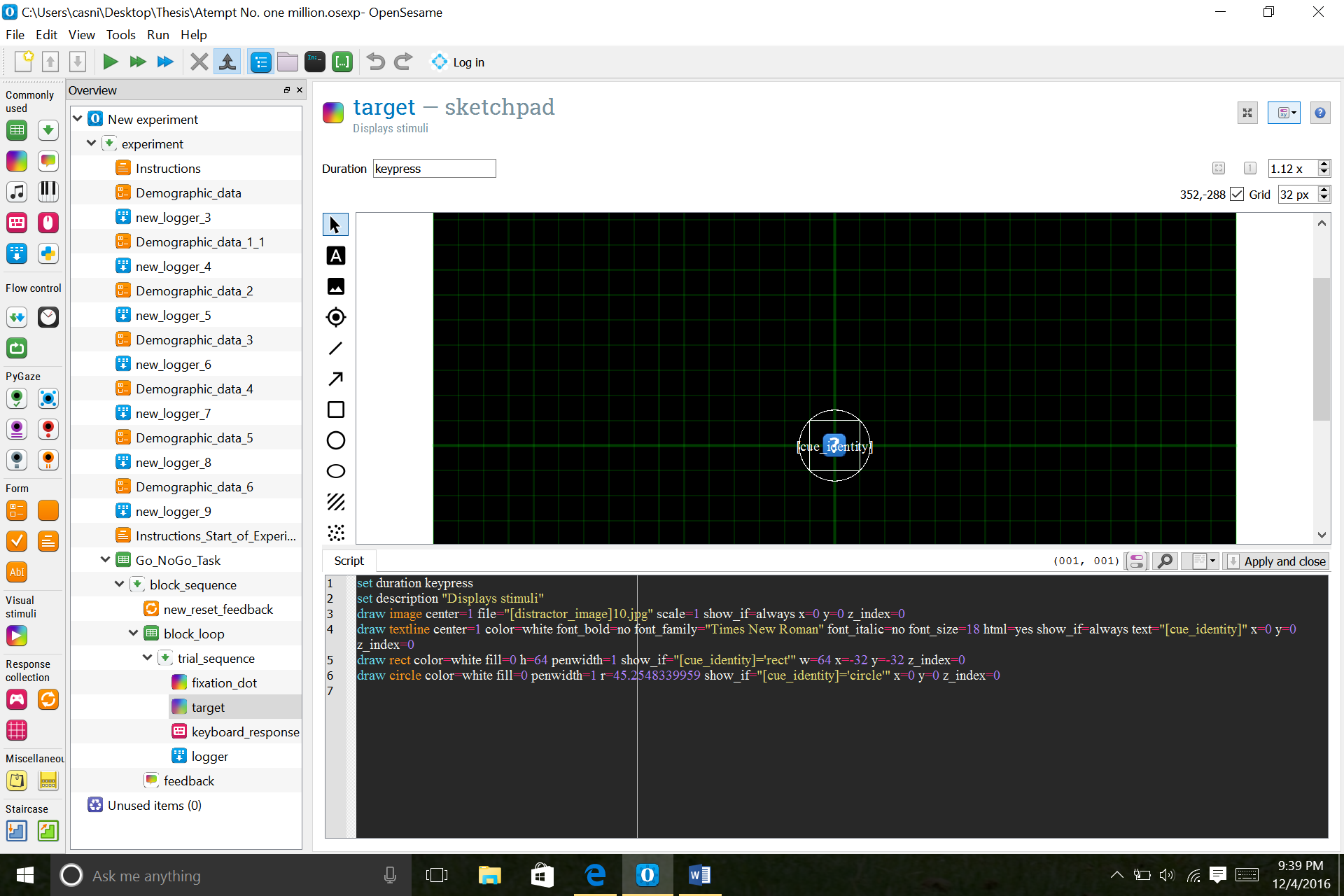
cue_identitywhich can have the valuescircleandrect. Then later you present the cue in asketchpadby drawing a rectangle and a circle and set theshow ifargument of each of them to[cue_identity]=='rect'(or 'circle').However, I strongly recommend you to first try to finish the tutorial. If it doesnt work yet, try to figure out why. We can also help with that, but if you understand the tutorial, your experiment will fall into place because it is basically the same paradigm.
Edaurd
Thank you so much for your help. I will definitely try.
One more question. If I have 84 distractor images half adversive and half neutral, what do I name each image so that they can appear randomly? These are all types of images.
If it is really entirely random, the name doesn't matter. For simplicity sakes, you could go for
['image1.png',..,'image84.png']. Then just randomly pick one and load respective image. If the category should be still retrievable, you could still have all images in a list, but just change the labels to'neutral1'...and'adversive1'....Does this make sense?
Eduard
Yes makes perfect sense. Thank you
Ok so I thought it made perfect sense but I received an error when trying to run the experiment. So the distractor images do need to appear randomly in the experiment however, when the actual experiment has been run, will the data file show which image file appeared with each trial? In other words I need to know if the distractor image had some kind of effect on response time or accuracy. I will attach two images, the first will be how I identified my variables and the second the script for my images (I know this is wrong because obviously I will need to include additional photos that will not include the no. 1 in the name. Please advise if I just set up my variables completely wrong or if I will have to list every single image in the variable section?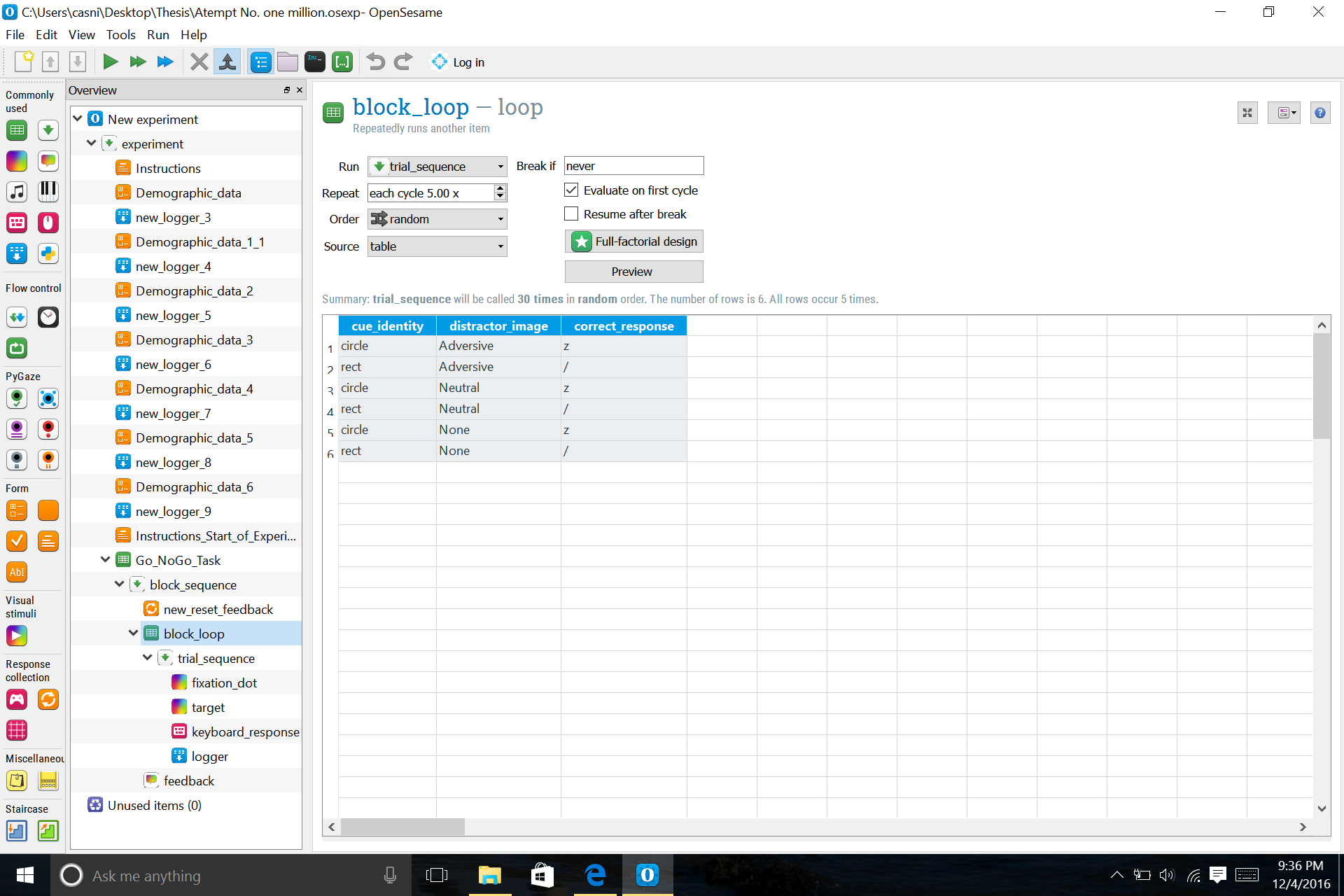
Hi,
On the first glance it looks fine to me. What is the error you struggled with? Or did you resolve it by now?
Eduard
I was able to figure it out. Thanks again for all your help!