

running from source

in OpenSesame
Hi all,
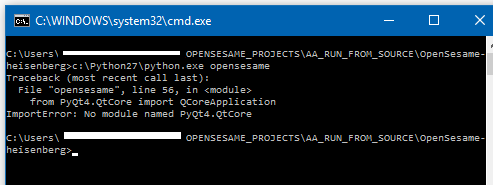
Am trying to run opensesame (2.9) from source, have downloaded all the minimally required files (see down), however, it does not work. At the moment I am getting the following error:
these are all the files in the opensesame folder:

Am I missing some simple steps, do I need other versions of the files? Any help would be welcome.
OS: windows 10, 64 bit,
Python - version 2.7.1 (:: Anaconda 2.4.1)
PyGame - via cmd 'pip install pygame', installed when in opensesame folder
PyQt4 - downloaded, all files in opensesame folder
QScintilla2 --> link refers to PyQ4t
QProgEdit --> downloaded 2.0.0 version for 2.9.0 heisenberg release
PyYAML - downloaded, all files in opensesame folder
Comments
Hi Roelof,
The first way to install packages in Anaconda is using the
conda installcommand.Some of the dependencies can be found in the CogSci conda channel. So you could install
qscintilla2as follows:The second way to install packages in Anaconda (as in any Python environment) is using
pip install. So you could install Expyriment as follows:The third (and non-preferred) way is by copying the source folder of a Python package to (in this case) the OpenSesame program folder. This works for some packages but you need to do it correctly, such that the package folder is copied (i.e. the folder than contains —that doesn't work.
__init__.py). Your strategy seems to be to copy folders more or less at randomSo what you want to do is:
An optional third step is rethinking whether you wouldn't rather get the latest version of OpenSesame, which is essentially an Anaconda environment with all dependencies already installed
Cheers,
Sebastiaan
Check out SigmundAI.eu for our OpenSesame AI assistant!
Ah, right that makes sense; I'll give it a shot, thank you for the quick feedback
for those interested in running "hestitant heisenberg" from source, the following commands seem to work
all of these are run in the folder where opensesame is unpacked, and like sebastiaan mentioned the
QProgEdit (v 2.0.0) has to be copied to this folder manually
https://github.com/smathot/QProgEdit/releases
and to run:
python opensesame
Thanks for sharing!
Check out SigmundAI.eu for our OpenSesame AI assistant!
Hi Roelof,
I'm just wondering why you install pyqt4 with pip, and not simply with conda. Moreover, since pyqt4 is a dependency of qscintilla2, it should already be installed automatically with the first command. Is there any reason why you explicitly installed it from the external channel?
Similarly, QProgEdit is also available from conda:
Yes, that seems a bit strange indeed, what happened if I did not specifically install the Pyqt4 with pip I got the same error as in the original question,
(no module named PyQt4.4QtCore).
After I installed it like mentioned it ran, but I am gonna give it another shot with only qscintilla2 and one with the conda install, see if it works
Tried to install Qprogedit via command line, but since it only runs with version 2.1.0, it seems easier to copy manually since this 'conda install -c cogsci python-qprogedit=2.1.0' does not seems to work. Also
'conda install -c anaconda pyqt==4.11.4' does work, but I still get the same error as in the beginning, which only resolved after install via pip, not sure why that is happening, thanks for the all feedback