


Playing Audio Kills Experiment

Hi everyone,
I'm attempting to play some audio (a beep sound) using a simple 'sampler' object on Ubuntu 24:
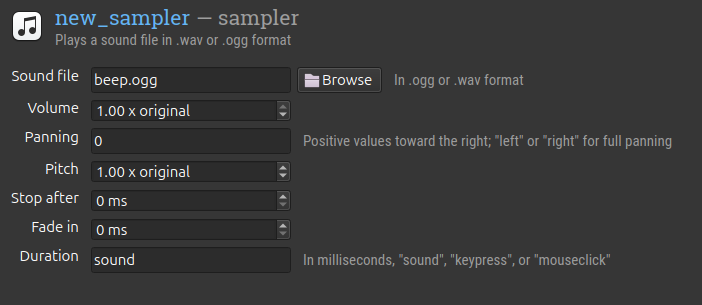
However, when attempting to run the experiment with the audio included, the experiment aborts immediately and throws an ExperimentProcessDied error, occuring "in the unknown phase of item unknown". The last messages in the console are:
Hello from the pygame community. https://www.pygame.org/contribute.html
[2026-04-29 17:21:54,826:psycho:132:INFO] scanning psychopy plugins
[2026-04-29 17:21:54,830:psycho:135:INFO] loading psychopy plugin: psychopy-visionscience
[2026-04-29 17:21:55,001:psycho:145:INFO] waitblanking = True
[2026-04-29 17:21:55,001:psycho:146:INFO] monitor = testMonitor
[2026-04-29 17:21:55,001:psycho:147:INFO] screen = 0
[2026-04-29 17:21:57,057:psycho:209:INFO] installing sounddevice plugin
[2026-04-29 17:21:57,383:experiment:336:INFO] experiment started
[253. 36.]
[544. 36.]
PTB-INFO: Using PortAudio V19.7.0-devel, revision unknown
This leads me to think there is something amiss with the plugins underlying OpenSesame's ability to play audio? Perhaps the PortAudio plugin or the Low Latency Plugin? I've installed both as far as I'm aware, using the directions found in the manual.
The experiment runs perfectly fine without the sampler object included.
Any help or suggestions would be greatly appreciated!
Comments
Hi @Artabanos
I'm not sure what's happening, but what you could try first is (1) if you have multiple audiofiles, make sure they have similar parameters (e.g., 44100 Hz and 16-bit), (2) go to the 'Back-end settings' and try using the sounddevice library instead of PTB, or (3) switch to the legacy backend, in case the issue is caused by a library/backend mismatch.
Have you tried running the experiment on another machine to see if the issue is specific to Linux or not? If none of these suggestions help, I would be happy to test it on my Windows computer, if you can share the experiment file.
Cheers,
Claire
Check out SigmundAI.eu for our OpenSesame AI assistant! 🤖
Hi @cvanbuck , Thank you for your helpful answer. It turned out that switching to the legacy backend did the trick on linux, which is great!
Out of interest I also ran the experiment on a windows laptop in my lab, and there were no issues there running the experiment using the PsychoPy backend. Perhaps this is something to keep in mind for us Linux users in general?
Thanks again for your help.