


Howdy, Stranger!

It looks like you're new here. If you want to get involved, click one of these buttons!

Supported by

Measure duration of key press

Hi! I'm making an experiment about time estimation, where the participant will hold down a key for three seconds (according to their own estimation). I'm having problem measuring the duration of the key press, though.

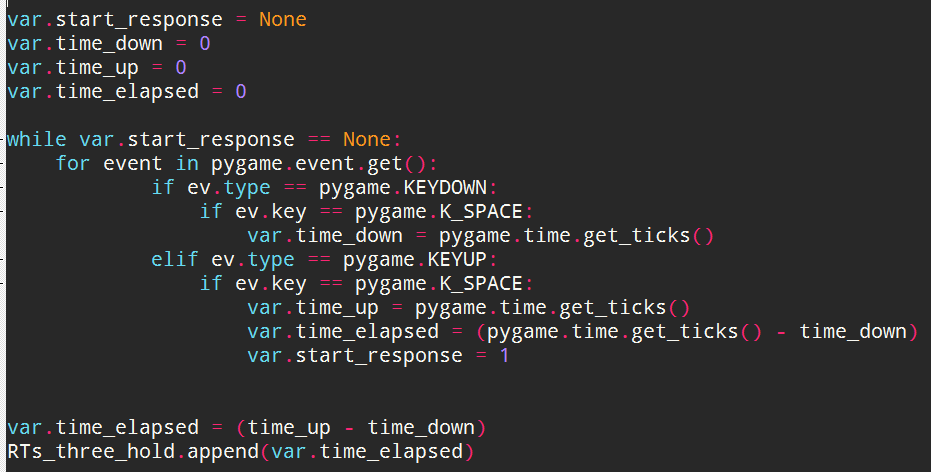
Here is one version I've tried, but when the experiment gets to the point of the inline script, the experiment stops and it says that it ended successfully. I'm new to OpenSesame and Python, so unfortunately I don't understand what goes wrong.

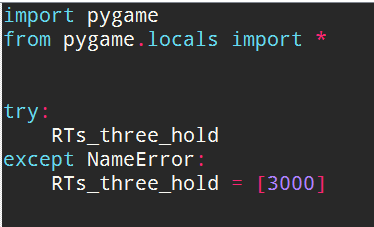
The prepare phase:
The run phase:
Comments

  • Hi Charlotte,

    The reason nothing happened, is that you only broke out of the for loop, but not out of the while loop. YOu would need another break statement outside the for loop that is only executed once you broke out of the for loop. Alternatively, you can also get rid of the for loop entirely (assuming that your participants are not pressing multiple keys simultaneously). Below is an example of the code for when you remove the for loop. I also added the presentation of a the current key press duration for illustration purposes.

    var.start_response = None
    var.time_down = 0
    var.time_up = 0
    var.time_elapsed = 0
    ok = False
    t0 = clock.time()
    
    cv = canvas()
    while True:
            # used for displaying the current key presses duration
            if ok:
                cv.text(str(pygame.time.get_ticks()-var.time_down),0,0)
                cv.show()
                cv.clear()
    
            # assume only one event, if event is empty proceed with next one
            # otherwise do the checks below
            eve = pygame.event.get()
            if len(eve) == 0:
                continue
            else:
                ev  = eve[0]
            if ev.type == pygame.KEYDOWN:
                if ev.key == pygame.K_SPACE:
                    var.time_down = pygame.time.get_ticks()
                    # used to display the current key press duration
                    ok = True
            elif ev.type == pygame.KEYUP and var.time_down != 0:
                if ev.key == pygame.K_SPACE:
                    var.time_up = pygame.time.get_ticks()
                    var.time_elapsed = (var.time_up-var.time_down)
                    break
            # break the loop if nothing happend in 10 seconds
            t1 = clock.time()
            if t1-t0> 10000:
                break
    
    #var.time_elapsed = (var.time_up-var.time_down)
    RTs_three_hold.append(var.time_elapsed)
    print RTs_three_hold
    

    Does this make sense?

    Eduard

    Buy Me A Coffee

  • @eduard is correct, of course. (You also mix up the name of the event, calling it event first and ev later.)

    But, just as a general remark, you can also use the for ... else pattern to deal with these kinds of nested loops, like so:

    while True:
        # Loop through all events and break the for loop when there is a KEYDOWN
        for event in pygame.event.get():
            if event.type == pygame.KEYDOWN:
                break
        # The else block is executed only when the for loop did *not* break. So
        # we continue the while loop if the for loop did *not* break.
        else:
            continue
        # If the for loop *did* break, we also break the while loop.
        break
    

    See:

  • Thank you so much, Eduard, it all works as it should now!

    And thank you Sebastian, I didn't even think about doing it that way, it's good to know that's a possibility!

    /Charlotte

Sign In or Register to comment.