


Pseudorandomization: Problem with the "constrain"-Function

Hi everyone!
I am not very experienced in building experiments (in opensesame and not at all  )
)
I have 32 pictures, of which i show 16 for three times, but I don't want two same pictures to follow each other. Other than that, the pictures should show up randomized. I think this should overall be possible, right?
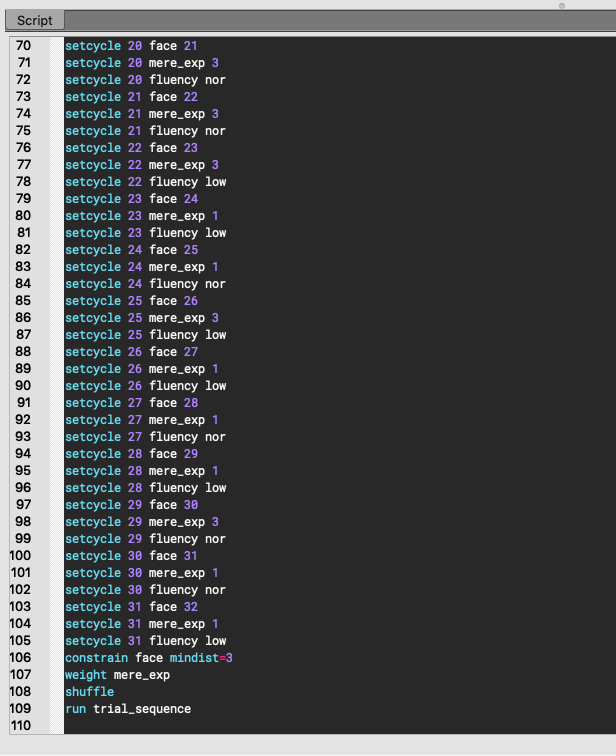
I tried to implement the constrain function and I think I added it in the right way (according to the tuturial, below the setcycle-functions etc).
Nonetheless, it's always the case, that at least one picture shows up twice in a row.
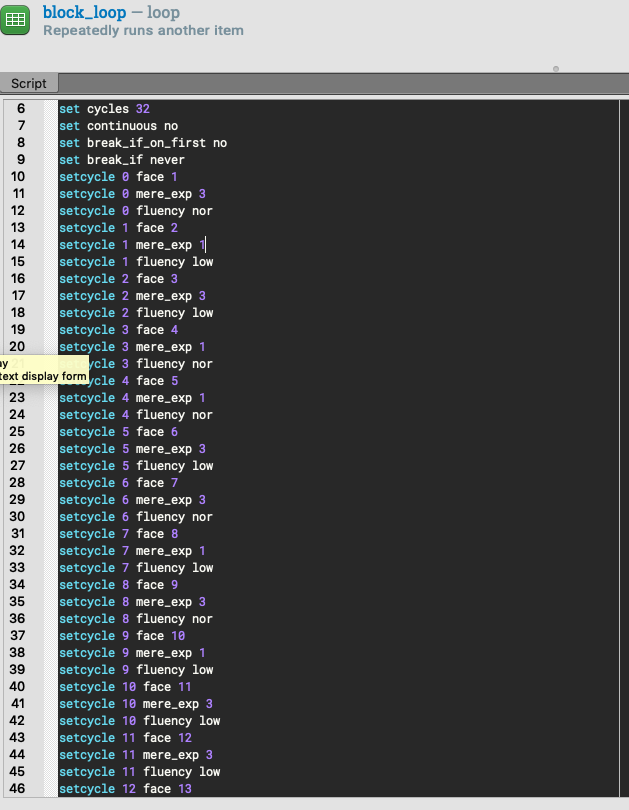
I will just copy the code from the loop table and hope that helps!
Thanks in advance 
Sofie
Comments
Hi Sofie,
The reason that pseudorandomization doesn't work here is that you apply loop operations afterwards, and these mess things up. The easiest solution would probably be to create a loop table that is already weighted (i.e. some rows occur more often than others), and then only apply the
constrainfunction. Does that make sense?Cheers!
Sebastiaan
Check out SigmundAI.eu for our OpenSesame AI assistant!
Hi Sebastiaan,
thank you for your reply!
I am not sure, if I understand it right. Does that mean, I have to make three rows in the loop table for one picture I want to show three times? Or is there another possibility?
(Since the summary of the loop table also says something about how often the rows occur ("number of the rows: 32, all rows occur once")..).
Best regards!
I tried it in the way I described above (adding more lines to the loop table, according to how often I want to show a face). It still does not work. What else can I possibly have done wrong?
Have nice holidays
Yes, exactly.
I don't know without seeing your script Could you upload your experiment here?
Check out SigmundAI.eu for our OpenSesame AI assistant!
Hi Sebastiaan,
thank you again for your rapid reply, and I wish you a Happy New Year.
I will upload the two versions of the experiment, one how I intended to do it first (1), and the other one, how I adapted it (3) according to your help (at least I hope so).
Unfortunately, I had to remove the pictures from the filepool due to confidentiality issues.
The aim of the experiment is to collect attractiveness ratings to faces with a different degree of perceptual fluency, which are shown in different frequentness. I hope that is understandable.
Best regards,
Sofie
Hi Sofie,
So here's the culprit:
First you're constraining the table such that repetitions of
facehave a minimum distance of 3. So far so good. But then you're shuffling the table again, which means that you're starting from scratch! So just removing theshufflecommand should do the trick, at least as far as I can see.Cheers!
Sebastiaan
Check out SigmundAI.eu for our OpenSesame AI assistant!
Hi Sebastian,
you are absolutely right! It works as desired and I could start testing now.
The only problem I now have left is my slider scale. I adopted it from the Forum here, and it works nicely.
Only thing is, that the reference point of the scale (starting point from where I can fill the bar) is always the rating position from the rating of the picture before.
So the rating is always affected from the rating before.
It would be awesome if there was a solution for that as well.
Thank you a lot!
It's very nice that everyone can find a solution by getting so much help in the forum.
I am already "advertising" for your program at my university
Just to be clear: You mean that you would like the initial value of the rating scale to be equal to the final value of the rating scale that preceded it, right? Because this is currently not the case.
Great!
Check out SigmundAI.eu for our OpenSesame AI assistant!
No, its actually the other way around!
When I conduct the experiment, the initial fill of the scale is the final fill from the rating of the picture before.
I tried to add something like "initial_fill = x=slider_x+300" somewhere in the code but it never worked..
What have I done wrong? Can I somehow "reset" the scale after using it?
Ow right, I see now. You have implemented your own slider widget. (I would not call it a rating scale. To me that suggests that there are multiple discrete options.)
It looks like the initial fill is determined by the initial position of the mouse cursor. Probably that's what causes the carry-over effect: people click and then leave the mouse where it is. Could that be it?
If so, then you can call
my_mouse.set_pos()just before the slider. I should say, though, thatmouse.set_pos()is ignored on some systems, so I'd check carefully on the experiment PC whether it actually changes the mouse position.Check out SigmundAI.eu for our OpenSesame AI assistant!
YES!! That's it. Now it works as I want it to be.
I created the slider as a mixture of different propositions here on the forum and since I am not educated whatsoever in programming, I did not think of the mouse as a possibility.
I am really happy I can conduct the study for my Bachelor thesis now.
Big Thank you again for the awesome support
Best regards,
Sofie
Good luck with that!
Check out SigmundAI.eu for our OpenSesame AI assistant!