


How to handle Num Pad input in OSweb?

Hi!
I'm trying to get people to rate certain things, which at the moment they do with just the numbers on the keyboard (which works fine!). However I want them to rate from 0 to 9. On the normal keyboard, the 0 comes after the 9 which makes it a bit less intuitive to score something a 0 instead of a 1 for example. Therefore I wanted to use the num pad for this, as the numbers are closer together here.
Apart from things such as 0;1;2;3 and ENTER;RETURN etc in my keyboard response, I've also tried putting in NUM_0However, I get the following error:
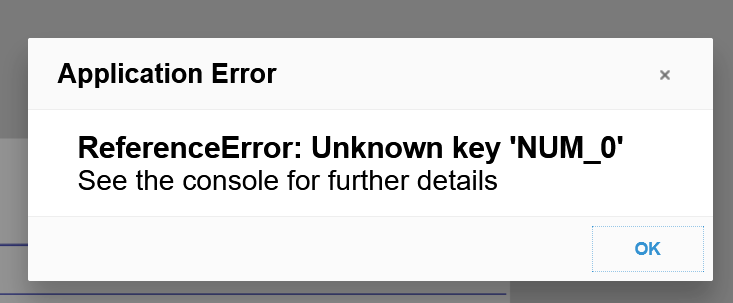
Is there any way to handle numpad input with OSWeb?
I've also tried other ways (e.g. kp0, np0) and while kp0 does not give an error, it does not allow me to type something in (as far as I can tell).
Will this difference in naming the keys be an issue if the experiment is running on other computers? (e.g. if their internal system does indeed code the numpad keys as NUM_0, while someone elses as np0)
Kind regards,
Sanne
Comments
Hi @Sannee ,
The numpad keys are called
kp0,kp1, etc. This is not obvious or documented properly, but you can see the list of valid key names here.You mention that you've tried
kp0, but that this did not allow you to type in anything. My first guess is that the numlock was not enabled. Could that be it? For me (when enabling numlock) it works perfectly under Chrome.— Sebastiaan
Check out SigmundAI.eu for our OpenSesame AI assistant!
Hi Sebastiaan!
Thanks for your quick answer! I have tried turning the num pad on and off while in the OSweb experiment version, but I cannot see anything happening sadly. My browser is Firefox, but I also cannot get it to work in the quick run environment.
This is what I currently have:
The main files here are the "Keyboard000" keyboard response item, where I've allowed the following inputs:
1;2;3;4;5;6;7;8;9;ENTER;RETURN;RIGHT;LEFT;kp0;kp1;kp2;kp3;kp4;kp5;kp6;kp7;kp8(as people are allowed to switch between boxes with the left and right arrow key and they have to give a score from 0 to 8)And the "KeyboardResponse000" Javascript inline file. In this file I indicate what is supposed to happen based on different keyboard inputs. E.g. if someone presses the right arrow key, then the selected box is shifted to the right. As I am currently debugging I have included a
console.log(vars.response)statement and a "hey if someone pressed 0 on the num pad, print something" if loop. The console.log does not print anything when I press something on the keypad, even though they are supposed to be accepted inputs, therefore the if statement currently also doesn't print anything.Do you know why the keyboard does not even catch the numpad input? I'm currently on version 3.3.7 of OpenSesame with osweb version 1.3.13.0.
Kind regards,
Sanne
EDITED TO ADD: Nevermind! I just found the reason it does not work. My problem was that while things such as num_0, num_1 etc work in the quick test window, they do not work in the OSweb window. I was debuggin in the quick test window and there kp0, kp1 etc are not accepted answers. Therefore I thought it was not working. I opened the console in the OSweb window however and it was actually coming into the printing loop! So from what I understand the kp0,kp1 etc are specifically input for the OSweb and do not work in OpenSesame's own run windows right?
Hi @Sannee ,
Good to hear that you figured it out!
Indeed, although the goal is to have experiments run in exactly the same way on the desktop and in the browser, the reality is that there are subtle differences, including the names of certain keys. Therefore you should always test an online experiment in the browser during development.
Also, and this applies both to the desktop and the browser, multiple key names can be used to refer to the same key when specifying the allowed responses (e.g.
kp0andKP0are synonymous). But of course theresponsevariable has only a single value, in this case the lowercase variantkp0.— Sebastiaan
Check out SigmundAI.eu for our OpenSesame AI assistant!