


Illogical Response_Time

Hi,
I am new to OpenSesame and currently using version 4.0. I noticed that the recording of RT does not make much sense. For instance, these are the numbers I get when I respond quickly:
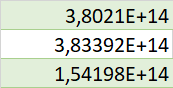
Sometimes the numbers are also with E+15 and E+16 even though there is a 2s time limit and these numbers are not consistent. Even OS itself does not calculate them correctly because the 'avg_RT' variable apparently read the first row as 38 ms (which is an impossible number) while the 2nd line was read as 383, thereby making the 'avg_RT' 210 ms. If anyone knows how I can just get 'normal' timing in milliseconds, that would be super helpful.
Thank you!
Comments
Hi @elinora18,
Based on the screenshot, I think you import the data file incorrectly into Excel. You need to change the decimal separator to being
.and not,(point instead of comma)38 ms (which is an impossible number)
It is not really impossible. It can happen if you press earlier than you should. Probably your experiment isn't correctly structured. If you share your experiment, I can try to find the problem.
Eduard
Hi Eduard,
Thank you so much for the reply. I tried your suggestion but from what I can tell, the log file only imports correctly if I use a comma delimiter.
I am attaching my experiment here. I only started working with OS yesterday so it's still pretty basic and full of tests. I would really appreciate your input.
Thanks again!
Hi,
Your experiment is fine.
I tried your suggestion but from what I can tell, the log file only imports correctly if I use a comma delimiter
To be clear, I am not talking about the character that separates cells in your table. That must be comma, as you say. I mean the character that indicates the decimal point. On English system this is per default
.for decimals and,for thousands. On Dutch (and some other European) system, this is reversed. The log files that Opensesame writes, use.as decimals, so you need to make sure this is preserved when importing your data file.Eduard
Hi Eduard,
Got it, thank you! I am in Europe for a new position, so this indeed may be the case. However, I don't know how I can make sure that using a colon as a decimal is preserved when importing files. Do you have any tips for this?
Thanks again.
Best wishes,
Elinor
Hi @elinora18,
If you open your csv files in Excel, the way to get around that probem is to first open an Excel document and then import the csv file.
It'll then allow you to specify which column separator you want to use.
Alternatively, if youre using using Windows, go to the regional settings and select English (United States) as your Regional format.
The latter solution will make your system use the US format (where the decimal point are ".", not ","). There must be something similar on Mac. Double-clicking should then open your csv file in Excel in the correct format directly.
Does this help?
Fabrice.
Hi Fabrice,
Thank you so much for the reply.
The change in the Windows settings indeed solved the problem. Thank you for the help!
Elinor